

ChatGPT Doesn't Have a Search Console. Here's How to Track Your Visibility Anyway
 Catalin Dinca
Every other channel in your reporting deck has an owner's dashboard. Google hands you Search Console, now including a Generative AI performance report for AI Overviews and AI Mode. Microsoft added an AI Performance report to Bing Webmaster Tools in February. Your email tool, your ad platforms and your social accounts all give you impressions, clicks and a trend line you can screenshot.
ChatGPT gives you none of that. OpenAI said in February 2026 that ChatGPT had reached 900 million weekly users, and there is still no property to verify, no impressions report and no list of the questions where your brand appeared. Rumours of a mention dashboard for verified businesses surface regularly; OpenAI has confirmed nothing, and you should not plan around it.
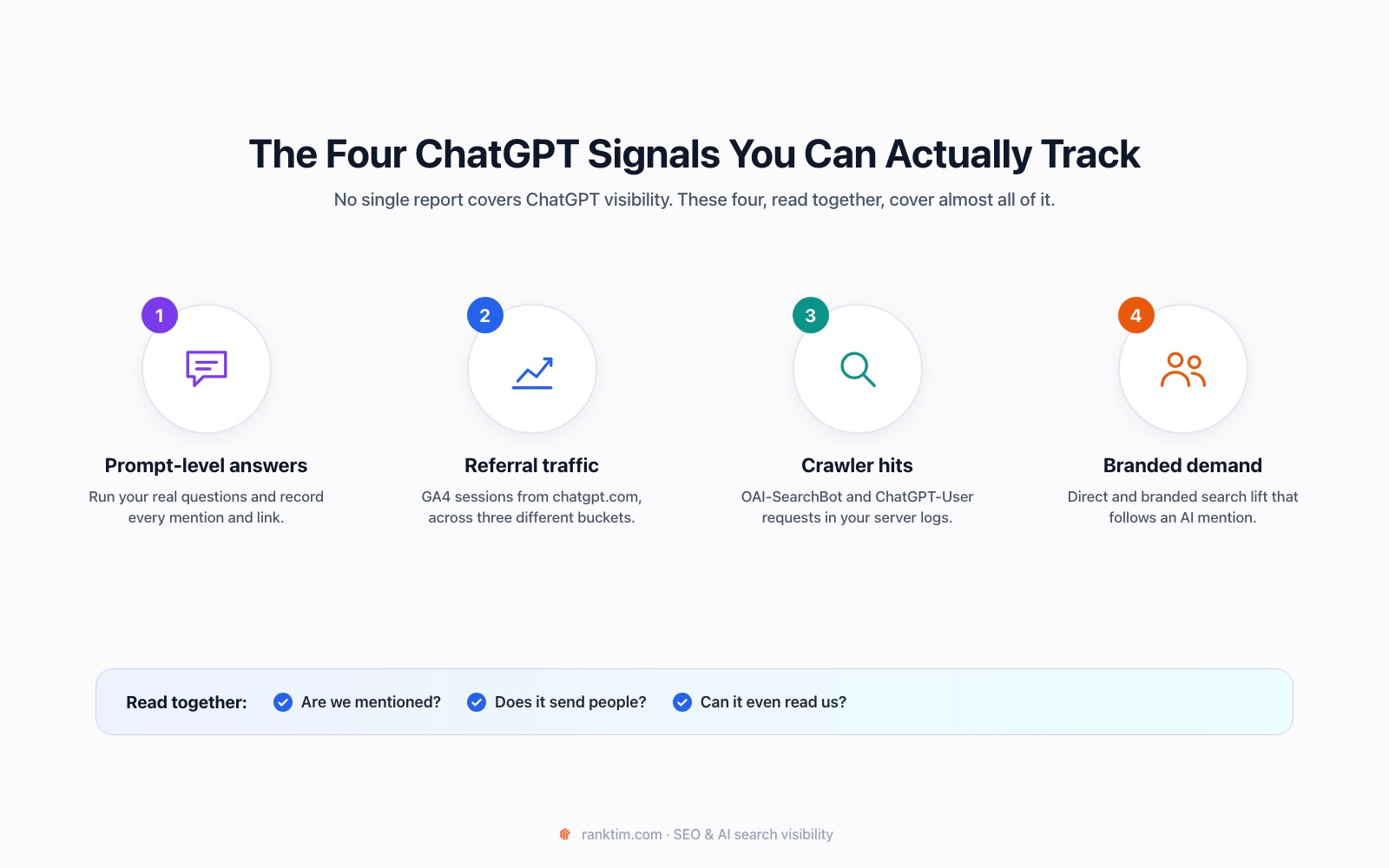
That absence is not a reason to stop measuring. It's a reason to measure differently. Four signals, none of which require OpenAI's cooperation, together tell you most of what a Search Console would. Here's how to collect them and what each one can and cannot prove.
TL;DR
- There is no ChatGPT Search Console, and probably won't be one soon. Any method that waits for OpenAI to publish your data is a method that never produces a number.
- Prompt-level tracking is the only direct read. Run a fixed set of real customer questions on a fixed cadence and log mentions, position, sentiment and cited URLs each time.
- GA4 splits ChatGPT clicks across three buckets: Referral, the AI Assistant channel (medium
ai-assistant) and plain Direct. Read only one and you will undercount badly. - Your server logs are the most underused signal.
OAI-SearchBotindexes you for ChatGPT search,ChatGPT-Userfetches a page live inside somebody's conversation, andGPTBotis training only. - Branded search and direct sessions are the lagging indicator that tells you whether AI mentions actually move demand.
- Report direction, not reach. You cannot know your ChatGPT impressions. You can know whether you're mentioned more often this month than last.
Table of Contents
- Why ChatGPT Is the Hardest AI Engine to Measure
- Signal 1: Prompt-Level Answers, the Only Direct Read
- Signal 2: Referral Traffic in GA4, and the Three Places It Hides
- Signal 3: Crawler Hits in Your Server Logs
- Signal 4: Branded Demand, the Lagging Indicator
- Put It in One Monthly Report
- What You Still Cannot Measure
- How Rank Tim Tracks ChatGPT Visibility for You
- Frequently Asked Questions
- Sources and Further Reading
Why ChatGPT Is the Hardest AI Engine to Measure
Three things make ChatGPT a harder measurement problem than Google AI Overviews or Perplexity, and it's worth being precise about them before you build a tracking process.
Answers are generated, not stored. A Google result page exists at a URL and can be fetched. A ChatGPT answer exists once, for one person, in one conversation, and is shaped by their account memory, their chat history and the model version they're on. There is no public artifact to crawl.
Most answers don't produce a click. ChatGPT answers the question in the chat window. A link is an optional extra, shown when the answer used live search. Even a perfect mention often sends zero traffic, which means traffic alone is a terrible proxy for visibility.
ChatGPT doesn't use one retrieval path. Some answers come straight from the model's training data, with no browsing and no citation. Some trigger a live search against OpenAI's own index. Some fetch a specific URL because the user pasted it. Each path leaves a different trace in your data, or none at all. Our explainer on why competitors get cited and your brand doesn't goes deeper into how that selection works.
So instead of one number, you collect four signals that overlap. None is complete; together they're enough to manage by.
Signal 1: Prompt-Level Answers, the Only Direct Read
This is the closest thing to an impressions report you will get: ask ChatGPT the questions your customers ask, and write down what it says.
Build a prompt set from real demand, not brand ego. Twenty to forty questions is enough for most businesses. Mix four types:
| Prompt type | Example | What it tells you |
|---|---|---|
| Category discovery | "What are the best AI visibility tracking tools?" | Whether you exist in the consideration set at all |
| Comparison | "Rank Tim vs [competitor] for tracking ChatGPT mentions" | How you're positioned against named rivals |
| Problem-first | "How do I know if ChatGPT recommends my company?" | Whether your content gets cited as the answer |
| Branded | "Is Rank Tim any good?" | What the model already believes about you |
If you don't know which questions to use, don't invent them. Our prompt research tutorial walks through pulling them from Search Console queries, sales call notes and support tickets.
Record the same five fields every run: whether your brand was mentioned, roughly where in the answer it appeared, the sentiment of the description, which URLs were cited, and which competitors appeared alongside you. The fifth field is the one teams skip and later wish they had.
Use a clean session. ChatGPT personalises answers using memory and chat history, so running your prompts from your own logged-in account measures your account, not the market. Use a temporary chat or a logged-out session so every run starts from the same place.
Fix the cadence. Weekly is right for most sites, monthly for slow-moving categories. The value is in comparability: same prompts, same conditions, same day of the week. One run tells you almost nothing; twelve runs tell you whether anything you published is working. Our brand visibility tracking tutorial covers the manual spreadsheet version if you want to start without tooling.
Signal 2: Referral Traffic in GA4, and the Three Places It Hides
When a ChatGPT answer does contain a link and someone clicks it, that session arrives in GA4 in one of three forms, depending on what the browser passed along and whether you tagged the link.
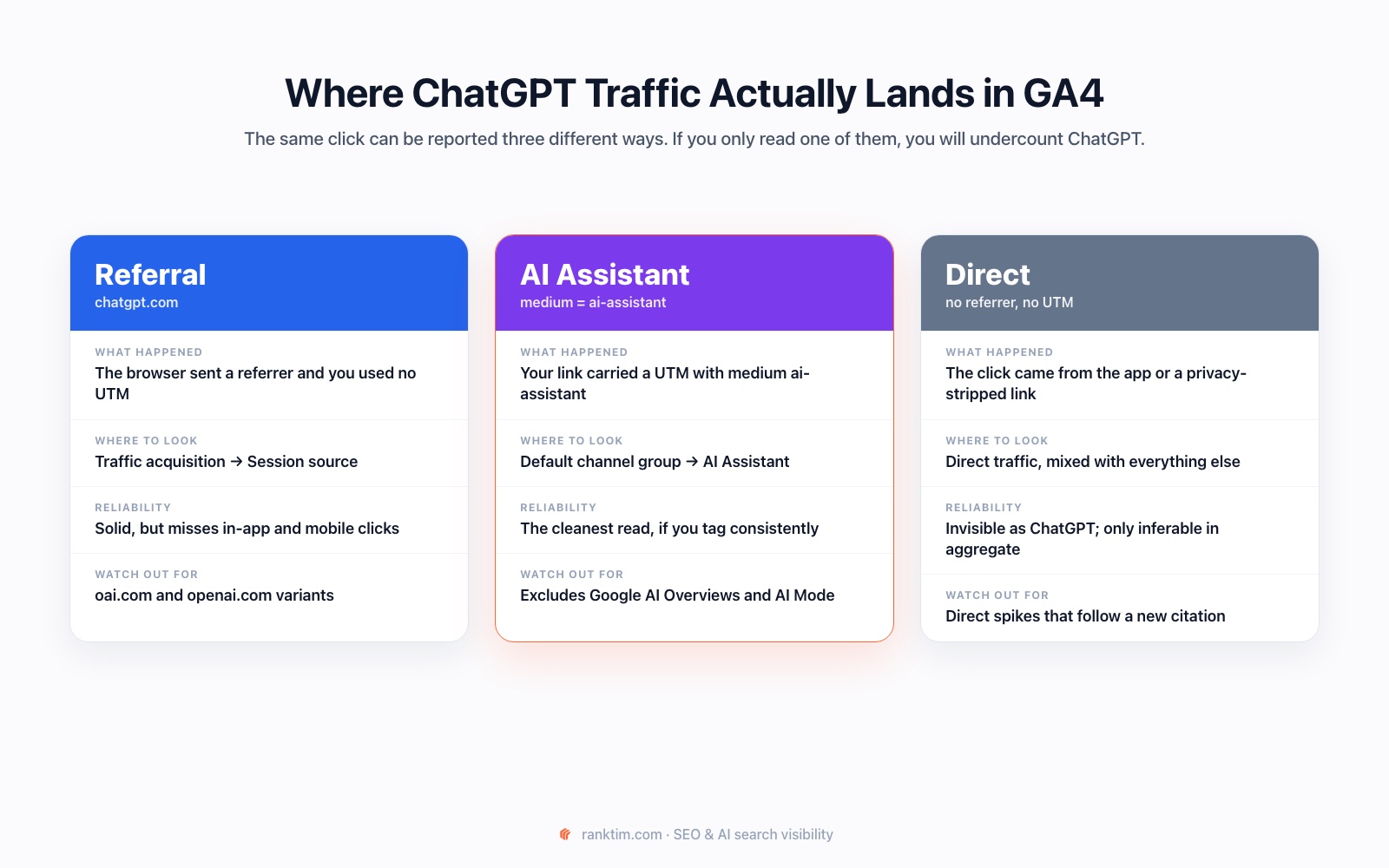
Referral. The clean case: the browser sent chatgpt.com as the referrer and no UTM overrode it. Find it under Traffic acquisition, Session source / medium. Watch for oai.com and openai.com variants too, and remember that clicks from inside the mobile app often don't pass a referrer at all.
AI Assistant. GA4 now has an official default channel group for AI assistants. A session lands there when the medium is exactly ai-assistant, which in practice means links you tagged yourself, for example in an llms.txt file or a syndicated answer. It's the cleanest read available, with one important limit: this channel does not cover Google AI Overviews or AI Mode, which stay in Organic Search.
Direct. Everything else. A click from the ChatGPT desktop or mobile app with no referrer and no UTM is indistinguishable from someone typing your URL. You cannot recover these individually, only notice that direct traffic rose in the weeks after a new citation appeared.
A practical setup: build one GA4 exploration filtered on a session source regex such as chatgpt|openai|oai\.com, and sit it next to a direct-traffic trend line. Our guide to tracking LLM traffic in GA4 has the full configuration.
Signal 3: Crawler Hits in Your Server Logs
This is the most underused signal in AI visibility work, and the only one that tells you whether ChatGPT can read you at all. OpenAI runs three separate crawlers and documents them publicly; they do very different jobs.
| User agent | What it does | What a hit means for you |
|---|---|---|
| OAI-SearchBot | Builds and refreshes the search index ChatGPT draws on when it browses | The visibility bot. If it never fetches a page, that page cannot be cited in a live answer |
| ChatGPT-User | Fetches a page on demand, inside a live conversation, because the user or the model asked for it | The closest thing to an impression you can observe. Somebody's conversation touched this URL today |
| GPTBot | Collects data that may be used to train future models | Not a visibility signal. Blocking it does not remove you from ChatGPT search results |
Pull a month of access logs and aggregate three ways: hits per bot per day, hits per URL, and response codes per bot. Three findings show up again and again. Pages that never get fetched by OAI-SearchBot are invisible to live ChatGPT answers no matter how good they are. A sudden drop in fetches usually traces back to a robots.txt edit or a firewall rule nobody connected to AI traffic. And repeated ChatGPT-User hits on a single URL are a strong hint that the page is being surfaced in real conversations.
Verify before you trust: user agents are trivially spoofed, so confirm hits against the IP ranges OpenAI publishes rather than the string alone. If you're deciding which of these to allow in the first place, our guide to AI crawlers and robots.txt covers the trade-offs for each bot.
Signal 4: Branded Demand, the Lagging Indicator
The first three signals measure exposure. This one measures whether exposure did anything.
Track branded query volume in Search Console as a time series, filtered to queries containing your brand name and its common misspellings. Track direct sessions alongside it. When an AI engine starts recommending you more often, the usual pattern is branded search rising before any referral traffic does, because a lot of people read the recommendation, then go look you up themselves.
Then add the cheapest attribution tool that exists: an open-text "How did you hear about us?" field on your main form. It will not scale into a dashboard, but "ChatGPT recommended you" written by an actual buyer is worth more in a board meeting than any modelled estimate.
See what ChatGPT says about you today
Rank Tim runs your real customer questions through ChatGPT, Google AI, Gemini and Perplexity, then shows which answers mention you, which pages get cited and which competitors show up instead.
Get a Free AI Visibility AuditPut It in One Monthly Report
Four signals in four separate tools is how measurement projects die. Collapse them into one page:
| Signal | Metric to report | Source | Cadence |
|---|---|---|---|
| Prompt answers | % of tracked prompts mentioning you; competitors per prompt | Tracking tool or manual runs | Weekly |
| Referral traffic | Sessions and conversions from AI sources; top landing pages | GA4 | Monthly |
| Crawler access | Unique URLs fetched by OAI-SearchBot; error rate | Server logs | Monthly |
| Branded demand | Branded impressions and clicks; direct sessions | Search Console + GA4 | Monthly |
One rule keeps this honest: every number gets a trend arrow and no number gets presented as a total reach figure. "Mentioned in 17 of 25 tracked prompts, up from 12 last month" is defensible. "Seen by 40,000 ChatGPT users" is not, and the first time someone asks you to prove it you'll wish you had never said it. If you also want the Google and Bing side of the picture, our guide to measuring AI search visibility covers the first-party reports that do exist.
What You Still Cannot Measure
Being explicit about the gaps protects you from being asked to close them.
You cannot get ChatGPT impressions, because OpenAI does not publish them and nothing can infer them from the outside. You cannot get true share of voice across all of ChatGPT, only across the prompts you chose to track, which makes prompt selection the most consequential decision in the whole process. You cannot attribute a purchase to a ChatGPT conversation unless the buyer tells you. And you cannot account for personalisation: the same prompt genuinely returns different answers for different people, so your tracked result is one sample, not the truth.
The right response is not to stop reporting. It's to report a direction of travel with a clearly stated method, the way you'd report brand awareness rather than ad impressions.
How Rank Tim Tracks ChatGPT Visibility for You
Doing all four signals by hand works, and it's how most teams should start. It also takes a morning a week and falls apart the moment the person who owns the spreadsheet goes on holiday.
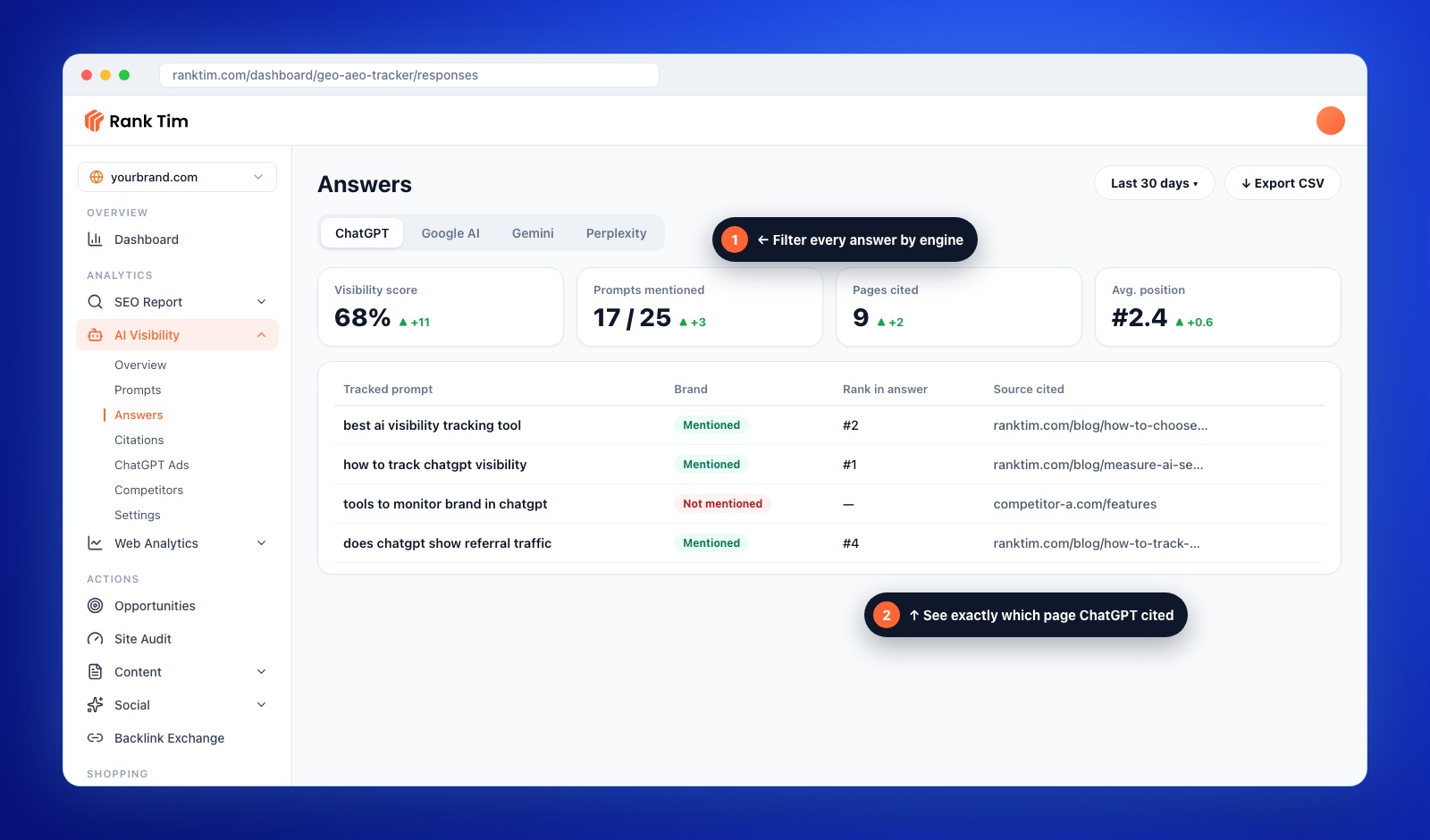
Rank Tim runs your tracked prompts across ChatGPT, Google AI, Gemini and Perplexity on a schedule and stores every answer, so the comparison is already built. Under AI Visibility you get Prompts, Answers, Citations and Competitors as separate views, each filterable by engine, so "how are we doing in ChatGPT specifically" is a filter rather than a project. Citations show which of your URLs each engine quoted, which closes the loop with the server-log signal. Web Analytics connects your GA4 property and splits out AI traffic so the referral side sits next to the mention side. And because the same tool holds Content and Opportunities, the gap you find on Monday becomes a brief on Tuesday rather than a note in a doc.
What it won't do is invent impressions. No tool can, and any tool that quotes you a ChatGPT reach figure is estimating something nobody has the data to estimate. If you're comparing options, our guide to choosing an AI visibility tool lists the questions worth asking before you pay for anything.
Stop Guessing What ChatGPT Says
Track your prompts, mentions and citations across every major AI engine, and watch the trend line instead of running the same questions by hand every Monday.
Start FreeFrequently Asked Questions
Does OpenAI have a Search Console for publishers?
No. As of November 2026 there is no verified-property dashboard, impressions report or query list for ChatGPT. OpenAI publishes crawler documentation so you can control access, but nothing that reports your visibility back to you. Reports of a mention dashboard for verified businesses circulate periodically and remain unconfirmed.
Why is my ChatGPT referral traffic so small?
Because most ChatGPT answers don't need a link. The answer is delivered in the chat, and a citation is an extra the user may never click. Low referral volume alongside frequent mentions is the normal pattern, not a sign that something is broken. It's also why referral traffic should never be your only ChatGPT metric.
Should I block GPTBot to protect my content?
That's a content-licensing decision, not a visibility one. GPTBot collects training data; OAI-SearchBot builds the index ChatGPT searches when it browses. Blocking GPTBot does not remove you from live ChatGPT answers, and blocking OAI-SearchBot does.
How many prompts should I track?
Twenty to forty for most businesses. Fewer than ten and a single wording change swings your whole score; more than fifty and nobody reviews the results. Spread them across discovery, comparison, problem-first and branded questions rather than loading up on branded ones, which almost always mention you and therefore teach you nothing.
How often should I re-run my prompts?
Weekly is the sweet spot. AI answers shift from week to week for reasons that have nothing to do with you, so daily runs mostly measure noise, and monthly runs miss the cause of a change. Keep the day of the week fixed so the comparison stays clean.
Does ChatGPT give everyone the same answer?
No. Memory, chat history, account settings and model version all influence the response, and the model is non-deterministic even without them. Use temporary or logged-out sessions for tracking so you're sampling a consistent baseline rather than your own history.
Can I see which of my pages ChatGPT cites?
Partly, from two directions. Record the cited URLs in every tracked answer, and cross-check against ChatGPT-User and OAI-SearchBot hits in your server logs. Pages that appear in both lists are your real AI-visible assets; pages in neither are invisible to ChatGPT no matter how they rank in Google.
Sources and Further Reading
- OpenAI: Overview of OpenAI crawlers
- Google Analytics Help: Default channel group
- Google Search Console Help: Generative AI performance report
- Microsoft Bing: Introducing AI Performance in Bing Webmaster Tools
- Google Search Central: Top ways to ensure your content performs well in AI experiences
- TechCrunch: ChatGPT reaches 900M weekly active users
- Featured photograph: Aerps.com on Unsplash, used under the Unsplash License and adapted to the Rank Tim visual style.

Catalin Dinca
Written by Catalin Dinca