

How to Track Your Brand in ChatGPT, Gemini & Perplexity: A Step-by-Step Tutorial
 Catalin Dinca
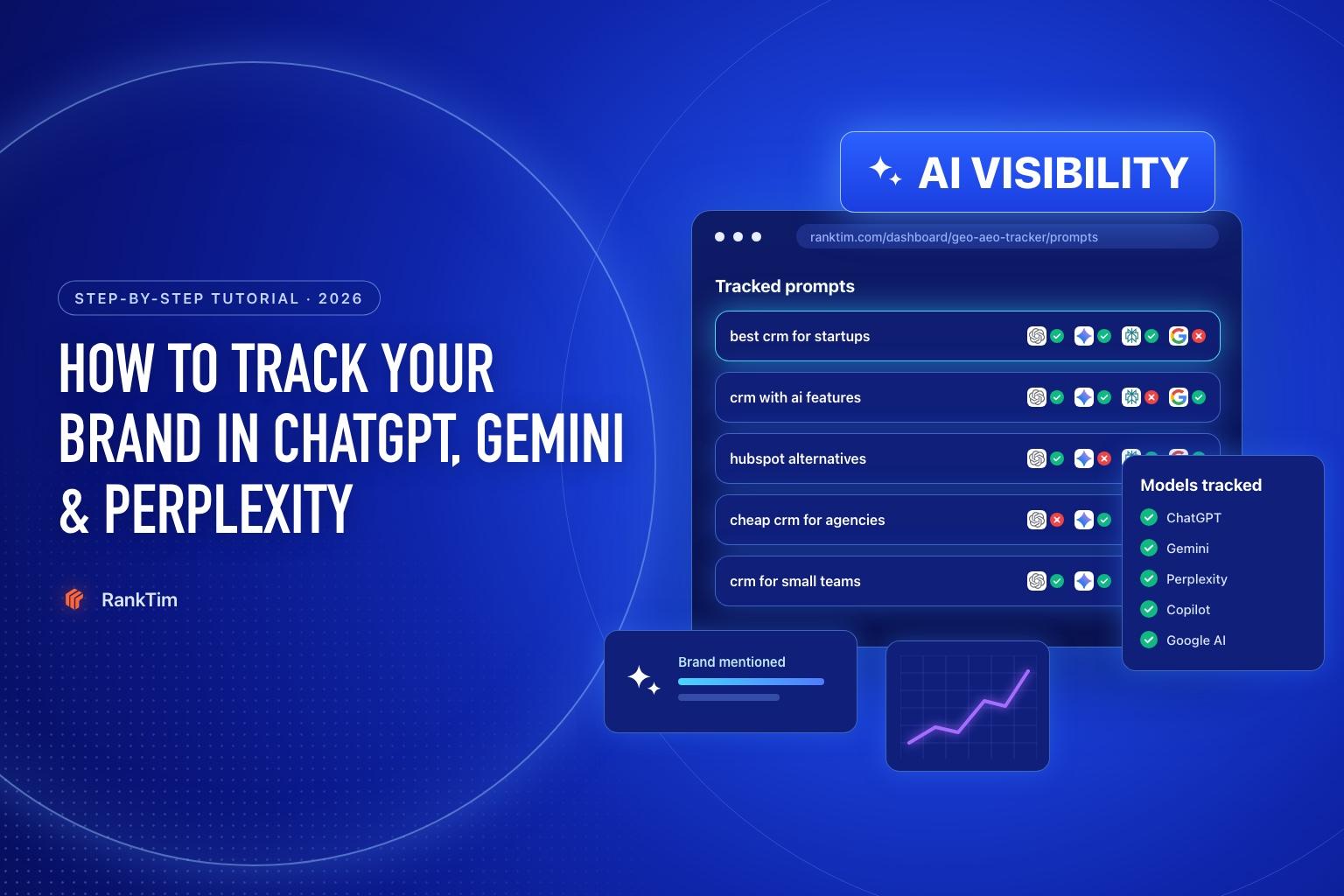
When someone asks ChatGPT "what's the best CRM for a small agency?", the answer names three or four brands and links a handful of sources. If you are not one of them, you lost that customer before they ever reached a search results page, and nothing in your analytics will tell you.
AI visibility tracking fixes that blind spot. You define the questions your buyers ask, run them across the main AI models on a schedule, and measure how often you are mentioned, where you appear in the answer, which of your pages are cited and how you compare to competitors.
This tutorial walks through the setup in RankTim step by step. If you prefer to start manually, there is a spreadsheet method at the end.
Time needed: about 20 minutes for setup, 10 minutes a week after that.
What You'll Measure
Before setting anything up, agree on what "visible" means. These are the metrics that matter, and the ones you'll see in the dashboard:
| Metric | What it tells you |
|---|---|
| AI Visibility | How strongly your brand shows up across the answers to your prompts |
| Brand mentions | How many answers name your brand |
| Share of Voice | Your mentions compared with your competitors' for the same prompts |
| Ranking / position | Where you appear in the answer: first recommendation or a footnote |
| Sentiment | Whether answers describe you positively, neutrally or negatively |
| Citations | Which URLs (yours and others') the models use as sources |
Step 1: Decide Which Questions to Track
Your results are only as good as your prompts. Track what real buyers ask, not the keywords you wish you ranked for. Aim for 20 to 50 prompts spread across four groups:
- Discovery: "best [category] for [audience]", "top [category] tools in 2026"
- Comparison: "[competitor] alternatives", "[you] vs [competitor]"
- Problem: "how do I [job your product does]", "why does [problem] happen"
- Brand: "is [your brand] worth it", "[your brand] pricing", "[your brand] reviews"
Write them the way people talk to an assistant: full sentences, specific context ("for a 10-person team", "in Romania", "under 50 EUR a month"). Good sources are your sales calls, support tickets, Search Console queries with question words and the People Also Ask box.
Step 2: Create Your Project
Open AI Visibility in the RankTim sidebar. The first tab, Project, tells the tracker who you are, so it can recognise your brand in answers and judge relevance.
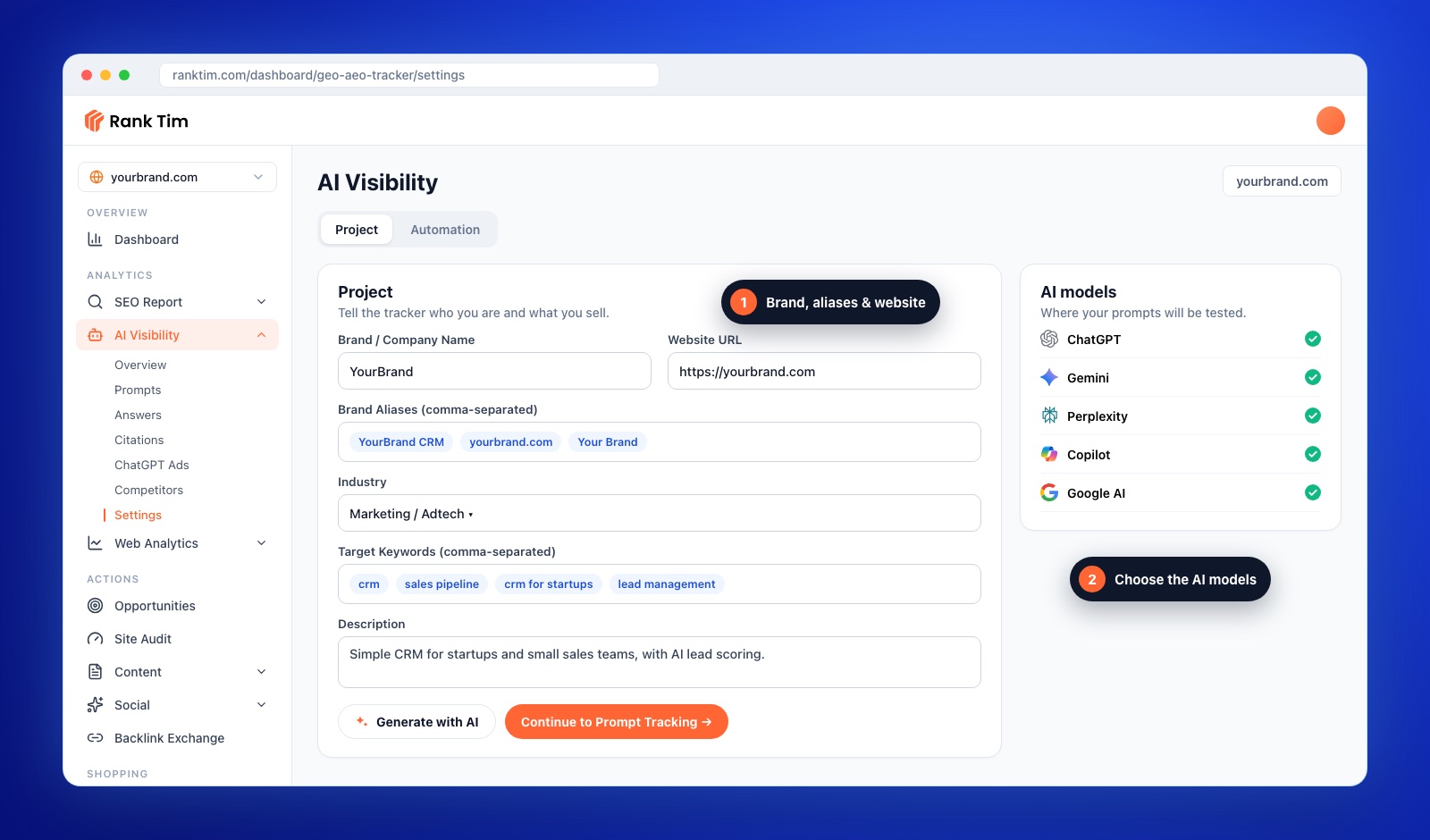
Fill in:
- Brand / Company Name and Website URL.
- Brand Aliases, comma-separated: every way your brand is written in the wild. Include the domain, common misspellings and product names ("YourBrand CRM", "yourbrand.com", "Your Brand"). Missing aliases are the number one cause of under-counted mentions.
- Industry, from the list or as a custom value.
- Target Keywords: the 5 to 15 topics you want to be associated with.
- Description: one or two sentences on what you sell and to whom. Click Generate with AI if you want RankTim to draft keywords and the description from your website, then edit them.
Choose the AI models you want to test, then click Continue to Prompt Tracking.
Step 3: Add and Organise Your Prompts
The Tracked tab is your prompt list. There are two ways to fill it: in the Project tab, use Generate your tracking prompts (later called Find more prompts) to get suggestions based on your project details, or add your own questions here with Add prompt. Most teams do both.
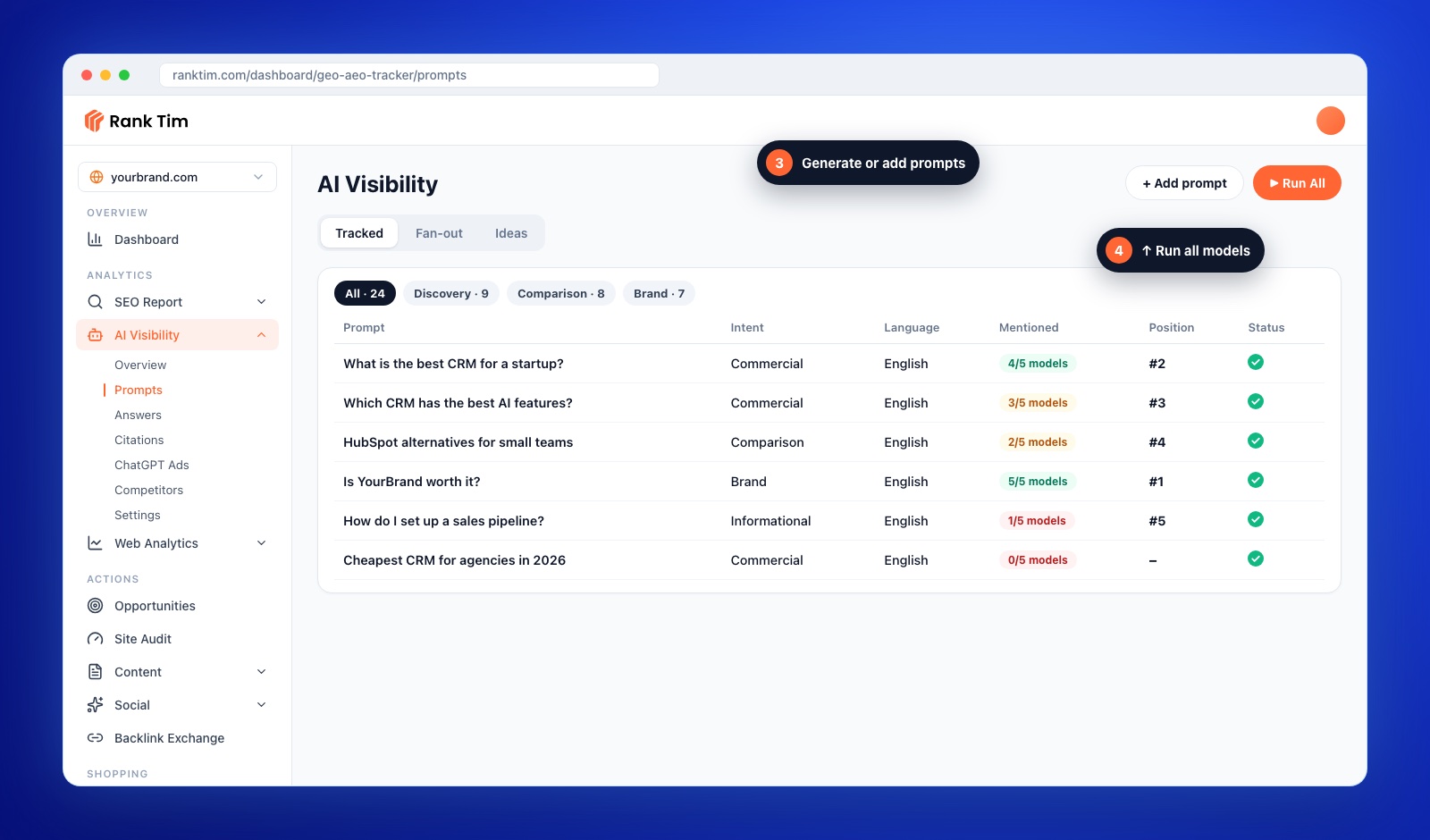
- Tag your prompts (Discovery, Comparison, Problem, Brand) so you can filter results by intent later.
- Set the language of each prompt to match how your customers ask.
- Activate the prompts you want counted in your scores; deactivate experiments so they don't skew the averages.
Generated prompts are a starting point. Delete anything a real customer would never type, and add the questions your sales team hears every week.
Step 4: Add Your Competitors
Share of voice only means something next to the right competitors. Open the Competitors tab, list your main competitors (comma-separated) and click Build Battlecards. Use the brands buyers actually compare you with, not the biggest names in the industry. Three to six is usually enough.
Battlecards summarise how AI models describe each competitor, which is useful context when you work out why they are recommended and you are not.
Step 5: Run the Prompts and Read the Answers
Click Run All. RankTim sends every active prompt to each selected model and stores the full answers, the sources cited and the brands mentioned.
Start in the Answers tab and read a few complete responses, especially for the prompts where you are missing. Numbers tell you that you are absent; the answers tell you why: which brands are recommended instead, what reasons the model gives, and which sources it leans on.
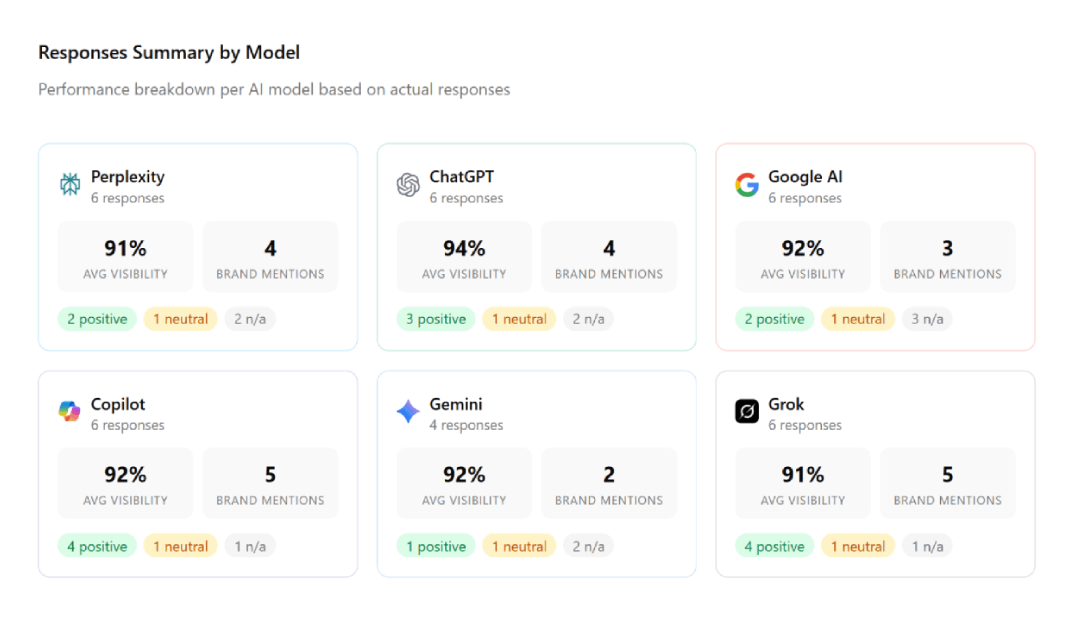
The summary by model shows something most teams don't expect: visibility is rarely the same across models. It is common to appear consistently in Perplexity and barely in ChatGPT, because they rely on different indexes and sources.
Follow along in your own account
AI Visibility is included in the Starter, Pro and Growth plans. Start the trial, open AI Visibility in the sidebar and you can have your first results in about 20 minutes.
Start Your Free TrialStep 6: Find the Gaps in Overview and Citations
The Overview tab brings everything together: AI Visibility, Share of Voice, Ranking, AI Brand Strength and Sentiment, plus a breakdown per model and your best-performing pages.
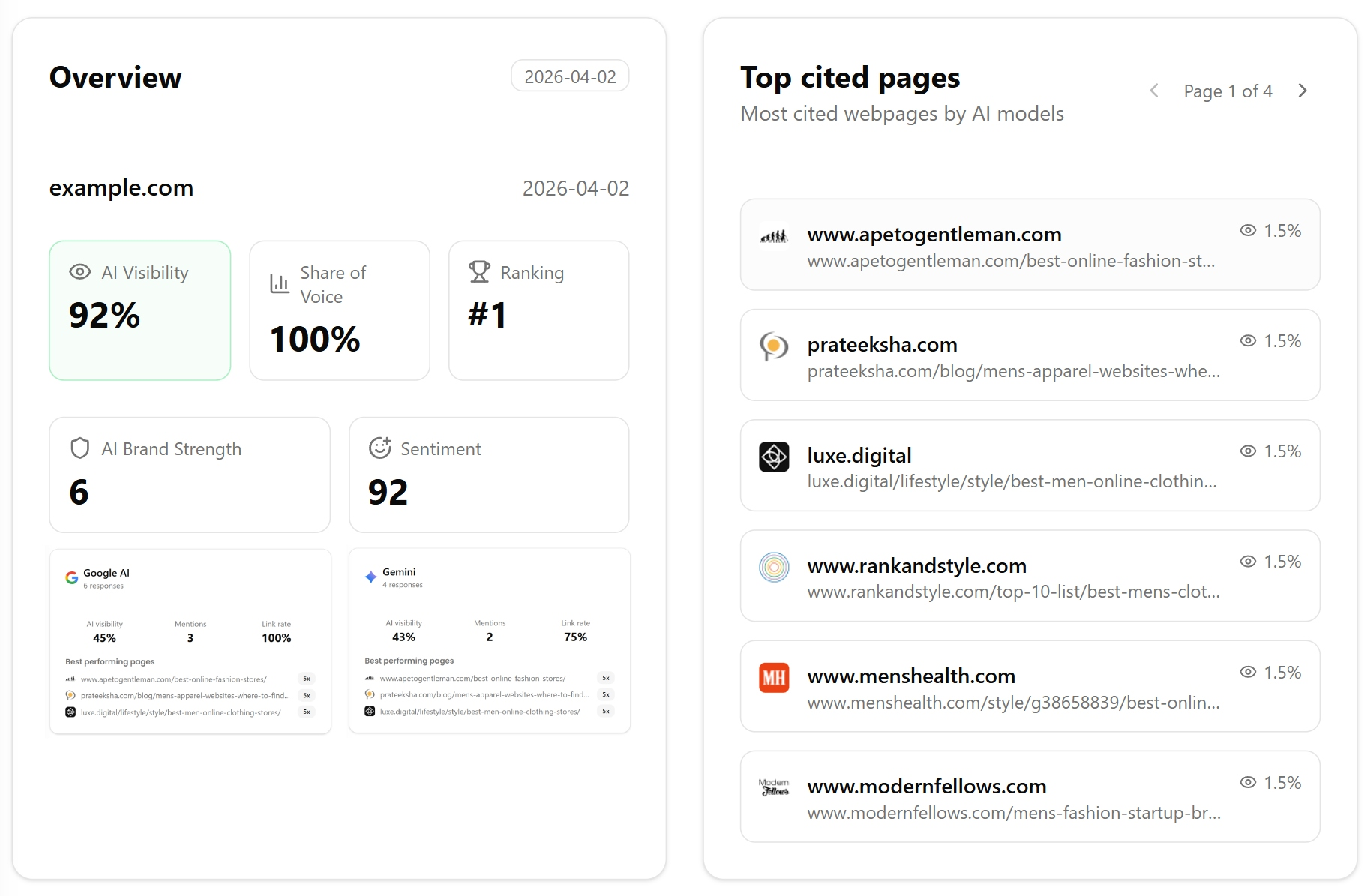
Then open Citations. This is where the action list comes from. For each prompt you are losing, look at which URLs the models cite:
- Your own pages cited? Those pages are working. Keep them current and link to them internally.
- A competitor's page cited? Compare it with your equivalent page. Usually it answers more directly, has more specific data or is newer.
- A third-party page cited (a review site, a "best of" list, a Reddit thread)? That is an outreach target: get included, get reviewed or join the conversation.
The Opportunities tab ranks these gaps for you, so you can start with the ones that appear across the most prompts and models.
Step 7: Automate Weekly Tracking
AI answers change from run to run, and one snapshot can mislead you. Open the Automation tab and turn on the scheduler so your prompts run automatically. You can still trigger an extra run any time with Run Now.
When results shift meaningfully, for example a competitor suddenly overtakes you on a group of prompts, RankTim raises a drift alert so you see it without checking the dashboard daily.
Step 8: Turn Results into a Weekly Action List
Tracking is only useful if it changes what you do. Use this table every week:
| What you see | Likely cause | What to do |
|---|---|---|
| Not mentioned at all on discovery prompts | Weak presence on the sources AI uses for the category | Get into the cited "best of" lists and review sites; publish a clear category page |
| Mentioned, but last in the list | Less evidence than competitors | Add specific data, customer results and comparisons to your key pages |
| Mentioned, but your pages never cited | Content not retrievable or not quotable | Check AI crawler access and rewrite key sections answer-first |
| Wrong facts about you (price, features) | Outdated or inconsistent information online | Update your pages, schema and third-party profiles with the same facts |
| Neutral or negative sentiment | Reviews or discussions the model draws on | Address the underlying issue and respond in the cited threads and reviews |
| Strong in one model, absent in another | Different indexes (e.g. Bing vs Google) | Check indexing in Bing Webmaster Tools as well as Search Console |
For the fixes on your own site, follow our tutorial on how to optimize your website for AI search. For the off-site side, our audit on why competitors get cited by ChatGPT and your brand doesn't goes deeper.
No Tool Yet? The Spreadsheet Method
You can start manually to see whether AI visibility matters in your market:
- Create a sheet with columns: Prompt, Model, Date, Mentioned (yes/no), Position, Competitors mentioned, Sources cited.
- Run 10 prompts in ChatGPT, Perplexity, Gemini and Google (noting whether an AI Overview appears).
- Use a logged-out or private session where possible, so personal history doesn't change the answers.
- Repeat every two weeks.
The limits show up quickly: 10 prompts across four models is 40 checks per round, answers vary between runs, and comparing sources by hand is slow. That is the point where automation pays for itself.
Frequently Asked Questions
How many prompts should I track?
Start with 20 to 50 across discovery, comparison, problem and brand intents. Fewer than that gives noisy averages; far more is hard to act on until you have a routine.
Why do my results change between runs?
AI answers are non-deterministic: the same prompt can produce different wording, brands and sources. That is why scheduled runs and trends over several weeks matter more than any single result.
Can I see the traffic AI assistants send me?
Partly. Clicks from ChatGPT, Perplexity, Gemini and Copilot can be isolated in GA4 with a custom channel; our guide on tracking LLM traffic in GA4 shows how. Mentions without clicks only show up in visibility tracking.
Which AI models should I track?
At minimum ChatGPT, Google AI (AI Overviews and AI Mode), Gemini and Perplexity. Add Copilot if your buyers use Microsoft 365, and Grok if your audience is active on X.
Which RankTim plans include AI Visibility?
AI Visibility tracking is included in the Starter, Pro, Growth and Enterprise plans. You can try it during the free trial.
You can't optimize what you can't see. Once you know which questions you are winning, which you are losing and which sources decide them, AI visibility stops being a mystery and becomes a weekly to-do list.
See What AI Says About Your Brand, Every Week
Track mentions, citations, sentiment and share of voice across ChatGPT, Gemini, Perplexity, Copilot, Google AI and Grok, and get alerted when something changes.
Start Tracking
Catalin Dinca
Written by Catalin Dinca