

How to Optimize Your Website for AI Search in 2026: A Step-by-Step Tutorial
 Catalin Dinca
AI search engines don't hand out ten blue links. They read a handful of pages, decide which ones they trust, and write an answer that cites some of them. Your job is no longer only to rank. It is to be retrieved, understood, quoted and recommended.
This tutorial is the hands-on version. Every step comes with what to do, how to check it and how long it takes. Work through it in order: each step only pays off once the one before it is in place.
What you need: access to your robots.txt and page templates (or a developer), Google Search Console, and about two to four hours for the first pass.
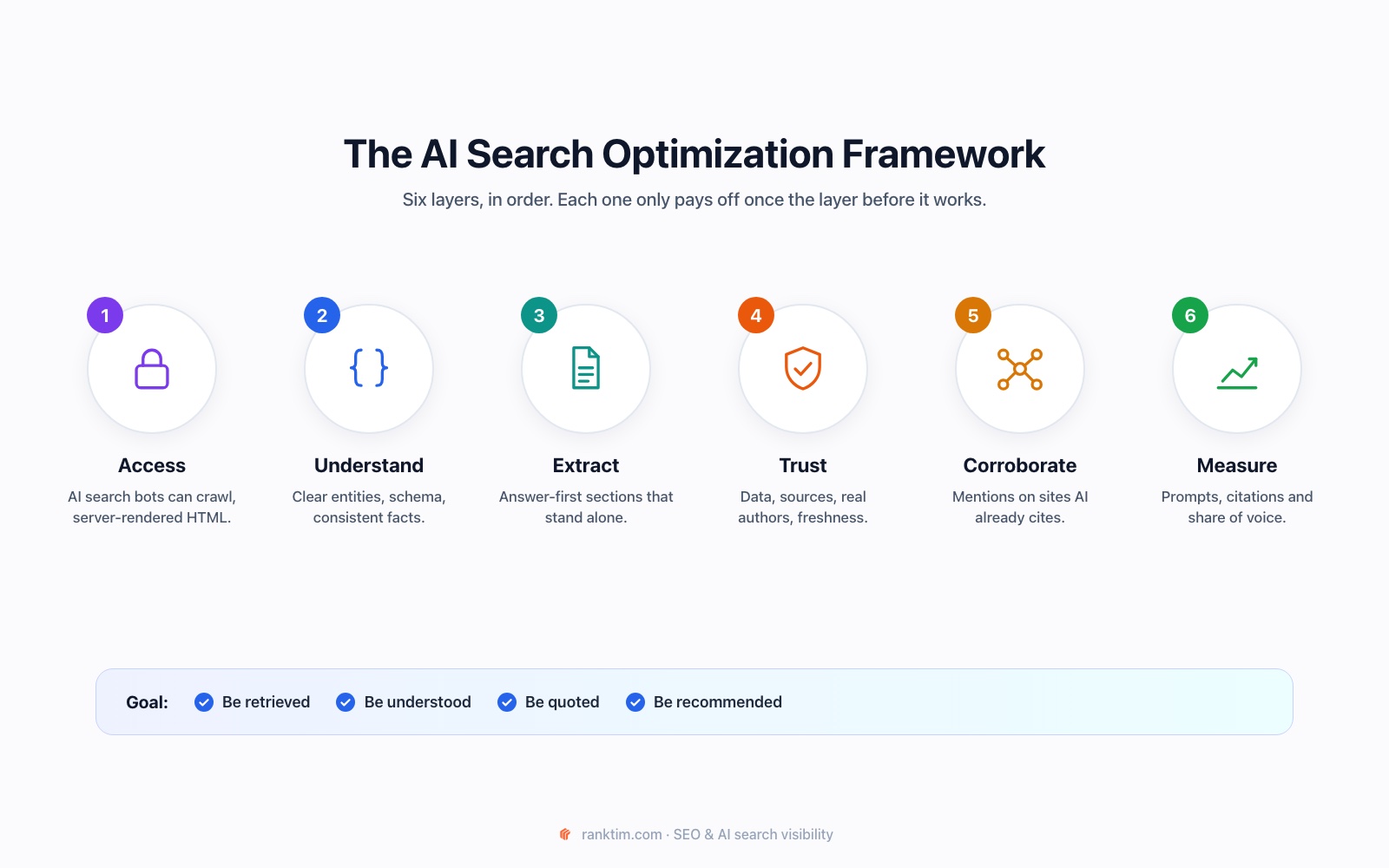
How AI Search Chooses Its Sources
Before touching anything, it helps to know what you are optimizing for. Most AI answer engines work in three stages:
- Retrieval. The system searches an index (Google's, Bing's, or its own) for pages relevant to the prompt. Google's AI features also run "query fan-out": they split one question into several related searches and pull results for each.
- Selection. From those results it keeps the passages that answer the question clearly and come from sources it considers reliable.
- Generation. It writes the answer and attributes some of it to the pages it used.
So there are three ways to lose: you are not retrievable (blocked, not indexed, not rendered), you are retrievable but not selectable (vague, buried answers), or you are selectable but not trusted (no evidence, no authority, contradicted by other sources). The steps below fix each one.
Step 0: Record Your Baseline (15 minutes)
You cannot improve what you have not measured. Write down 10 to 20 prompts your customers would actually type, for example "best CRM for a 10-person startup" or "is [your brand] worth it". Run each one in ChatGPT, Perplexity, Gemini and Google (check whether an AI Overview appears) and note:
- Is your brand mentioned?
- Is one of your pages cited as a source?
- Which competitors and which third-party sites are cited instead?
This list is your benchmark for every change you make. Doing it by hand once is useful; doing it every week is where a tracker saves hours (see Step 8).
Step 1: Let the Right AI Crawlers In (20 minutes)
The most common reason a site never appears in AI answers is that the search bots are blocked, often by a security plugin, a CDN rule or a copied robots.txt. The important nuance: each AI company runs separate bots for search and for model training, and you can treat them differently.
| User-agent | Company | What it does | Recommendation |
|---|---|---|---|
| Googlebot | Search index, which also powers AI Overviews and AI Mode | Allow | |
| Bingbot | Microsoft | Bing index, used by Copilot and several other assistants | Allow |
| OAI-SearchBot | OpenAI | Indexes pages for ChatGPT search results | Allow |
| ChatGPT-User | OpenAI | Fetches a page when a user asks ChatGPT to | Allow |
| Claude-SearchBot | Anthropic | Indexes pages for Claude's search results | Allow |
| Claude-User | Anthropic | Fetches a page when a Claude user asks | Allow |
| PerplexityBot | Perplexity | Indexes pages for Perplexity answers | Allow |
| GPTBot | OpenAI | Collects content for model training | Your choice |
| ClaudeBot | Anthropic | Collects content for model training | Your choice |
| Google-Extended | Controls use of your content for Gemini training and grounding (not a separate crawler) | Your choice | |
| CCBot | Common Crawl | Open dataset widely used for training, not live search | Your choice |
Two facts that many guides get wrong:
- Blocking Google-Extended does not remove you from AI Overviews. Google's documentation states that Google-Extended does not affect inclusion in Google Search. AI Overviews are part of Search and use Googlebot.
- Blocking GPTBot does not remove you from ChatGPT search. OpenAI documents that OAI-SearchBot and GPTBot are controlled independently. You can opt out of training and still be cited.
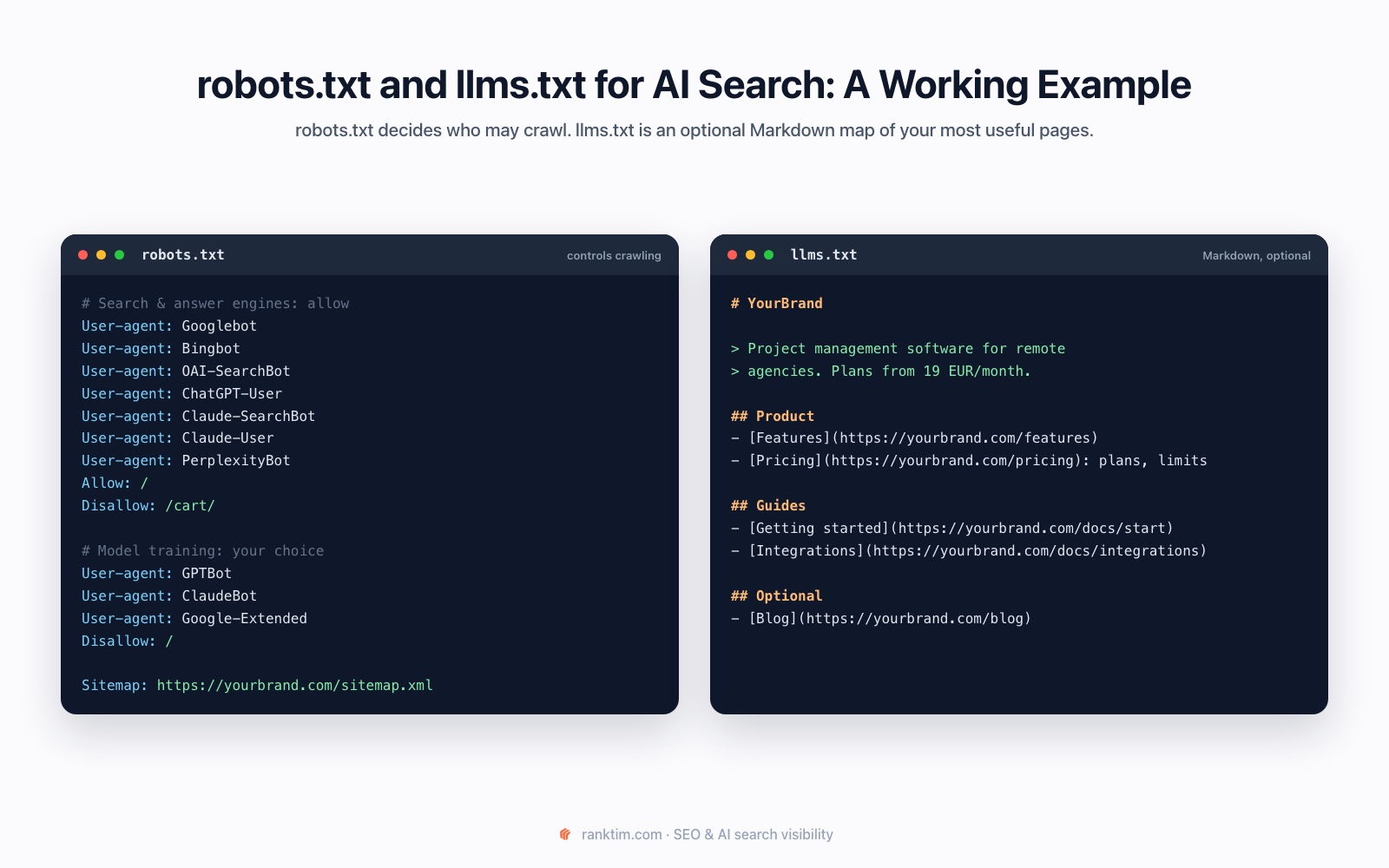
How to check it. Open yourdomain.com/robots.txt and search for each user-agent above. Then confirm that nothing in front of your site (Cloudflare bot rules, a WAF, a WordPress security plugin) blocks them. You can simulate a bot request from a terminal:
curl -s -o /dev/null -w "%{http_code}\n" -A "OAI-SearchBot" https://yourdomain.com/
curl -s -o /dev/null -w "%{http_code}\n" -A "PerplexityBot" https://yourdomain.com/
A 200 means the page is served. A 403 or a challenge page means something blocks the bot even if robots.txt allows it.
Step 2: Make Sure Your Content Exists Without JavaScript (30 minutes)
Googlebot renders JavaScript. Most AI crawlers do not. An analysis of AI crawler traffic published by Vercel found that the crawlers behind ChatGPT and Claude download JavaScript files but don't execute them. If your text, prices, FAQs or schema are injected client-side, those bots see an empty shell.
How to check it. Fetch a key page the way a non-rendering bot does and look for a sentence from the middle of the page:
curl -s -A "OAI-SearchBot" https://yourdomain.com/pricing | grep -i "per month"If the text isn't in the raw HTML, fix it with server-side rendering or static generation (Next.js, Nuxt, Astro and most modern frameworks support this), or pre-render your important templates. Check the same for your JSON-LD: it has to be in the server response, not added by a tag manager.
Step 3: Rewrite Key Sections Answer-First (1 to 2 hours)
AI systems quote passages, not pages. A section that answers its own heading in the first sentence or two can be lifted into an answer intact. A section that warms up for three paragraphs usually can't.
Use this pattern for every important heading: question-style heading → direct answer in one or two sentences → supporting detail, steps or data.
Before:
Pricing considerations. When thinking about cost, there are many factors businesses should keep in mind, and the right choice depends on several variables...
After:
How much does a CRM cost for a small team? Most CRMs for teams of 5 to 10 people cost between 15 and 50 EUR per user per month in 2026. The price depends on three things: automation limits, the number of contacts and whether reporting is included.
What makes the second version quotable: it answers immediately, it contains specific numbers, and it still makes sense if it is the only paragraph someone reads.
Practical rules:
- Start with your top 10 pages by business value, not the whole site.
- Turn vague headings into the questions people ask. Search Console's Queries report and the People Also Ask box are good sources.
- Use tables for comparisons and numbered lists for processes. They are extracted more reliably than prose.
- Keep one clear intent per page. If a page answers five different questions, split it.
Step 4: Make Your Entities Unambiguous (45 minutes)
AI systems reason about entities (your brand, products, people, places) and how they relate. If your company name, description, pricing and founders differ between your website, LinkedIn, G2 and Crunchbase, models have to guess, and they often pick someone else's version.
- Write one canonical description of what you do, for whom, and where, and reuse it everywhere.
- Add Organization schema to your homepage with a stable @id and sameAs links to your official profiles.
- Use Person schema for authors and link articles to them.
- Name things consistently: the same product names and the same spelling of your brand across the site.
Our schema markup guide for AI search has copy-ready JSON-LD for each of these.
Skip the manual checks
RankTim's AEO Audit checks AI crawler access, server-rendered content, schema and answer structure across your pages, then lists what to fix first.
Run an AEO AuditStep 5: Add Evidence AI Can Trust (ongoing)
When several sources disagree, models favour the one that shows its work. Every important page should contain at least one thing a model can verify or attribute:
- Specific numbers with a source and a date ("according to Pew Research Center, July 2025...").
- First-party data: your own benchmarks, customer results or survey data. This is the hardest thing for competitors to copy and one of the most cited content types.
- A named author with real credentials, linked to an author page.
- A visible "last updated" date that matches dateModified in your schema, and that you only change when the content really changes.
Step 6: Get Corroborated Where AI Already Looks (ongoing)
An answer engine rarely relies on your site alone. It checks what others say about you. For commercial prompts like "best X for Y", AI answers lean heavily on review platforms, "best of" lists, forum discussions, YouTube and industry publications.
Look at the third-party pages cited in your baseline from Step 0. Those are your targets:
- Get included in the "best X" lists that keep getting cited.
- Keep review profiles current (G2, Capterra, Trustpilot, Google Business Profile, depending on your market).
- Participate genuinely in the Reddit and community threads that show up for your prompts.
- Pitch data or expert input to the publications AI already trusts in your niche.
Our practical audit on why competitors get cited by ChatGPT and your brand doesn't shows how to find and prioritise these gaps.
Step 7: Keep Your Cited Pages Fresh (30 minutes a month)
AI assistants favour current information. An Ahrefs analysis of about 17 million citations found that AI assistants tend to cite fresher content than Google's classic organic results. Once a page is being cited, protect it:
- Review your most-cited pages monthly and update outdated numbers, prices and screenshots.
- Add new questions that appear in AI answers for your prompts.
- Update dateModified only when you have made real changes.
Our content refresh guide covers how to find pages that are starting to slip.
Optional: Add an llms.txt File (15 minutes)
llms.txt is a proposal, published by Jeremy Howard in 2024, for a Markdown file at the root of your site that gives language models a short summary of what you do and links to your most useful pages. The correct format is plain Markdown: an H1 with your name, a blockquote summary, then H2 sections containing lists of links, with an optional section called "Optional" for secondary pages (see the example image above). It is not a robots.txt-style file with Allow or Disallow rules.
Be realistic about it. No major AI search provider has confirmed that it uses llms.txt to choose or rank sources, and Google representatives have said Google Search doesn't use it. It is cheap to add and can help AI coding tools and agents navigate documentation, but it will not compensate for a blocked crawler or a JavaScript-only page. Do Steps 1 to 7 first.
Step 8: Measure, Then Repeat
AI visibility changes from run to run and model to model, so a single manual check tells you little. What you want to track over time:
- AI visibility: the share of your prompts where your brand is mentioned.
- Citations: which of your URLs are cited, and how often.
- Share of voice: your mentions compared to competitors for the same prompts.
- Referral traffic from AI assistants, which you can isolate in GA4 (here is how).
How RankTim automates the loop
RankTim's AEO Audit checks the technical side of this tutorial across your site: AI crawler access in robots.txt, content and schema that only appear after JavaScript, missing Organization, Article, FAQ or Product markup, and answer structure. Each issue comes with a fix.
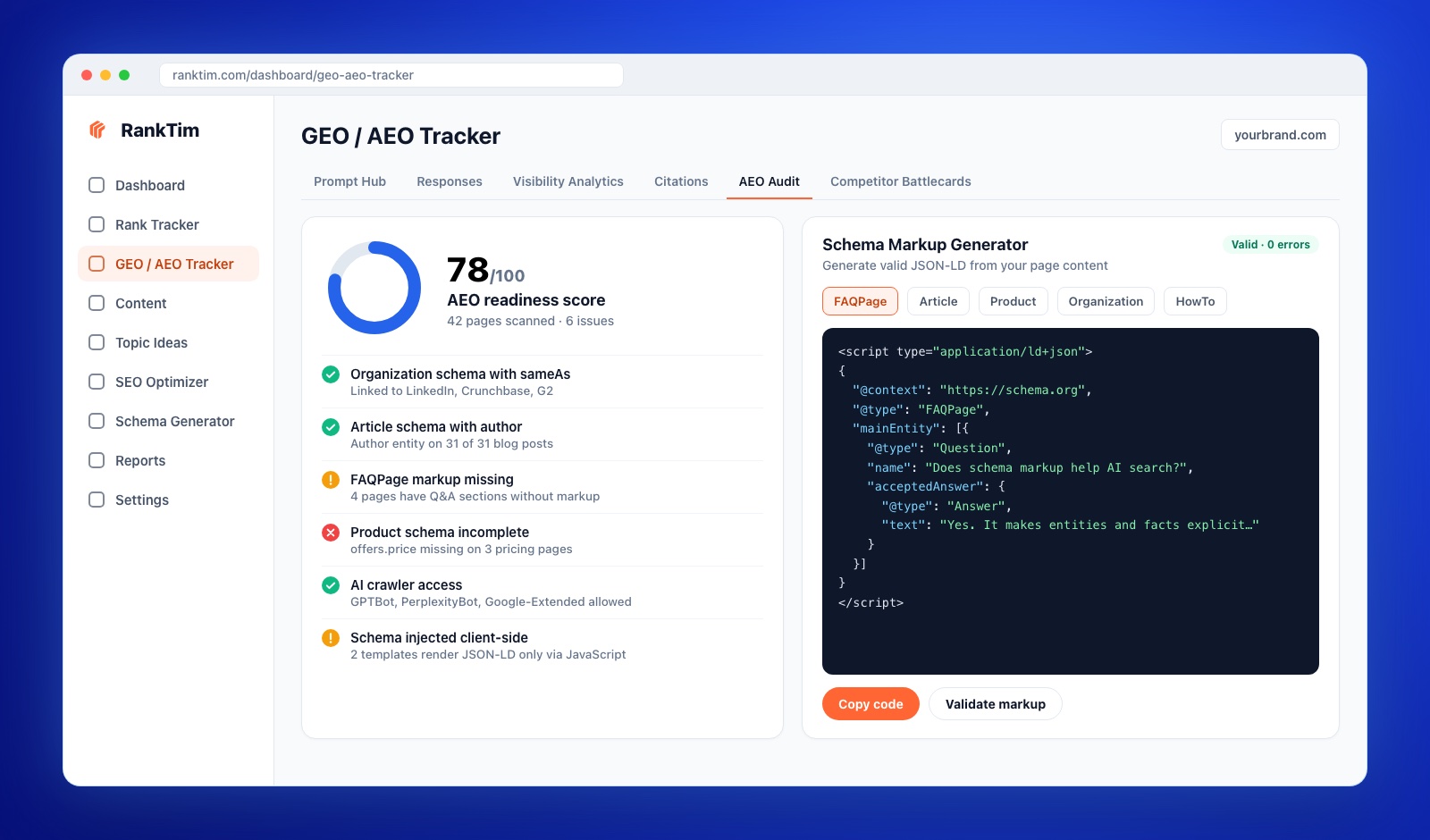
Then the AI Visibility tracker runs your prompts on a schedule across ChatGPT, Gemini, Perplexity, Copilot and Google AI and shows your visibility, citations and share of voice against competitors, so you can see which changes actually moved the needle. Our step-by-step guide on how to track your brand in ChatGPT, Gemini and Perplexity shows the full setup.
The One-Page Checklist
- Baseline: 10 to 20 real prompts tested and recorded
- Googlebot, Bingbot, OAI-SearchBot, Claude-SearchBot and PerplexityBot allowed, and not blocked by your CDN or firewall
- Training bots (GPTBot, ClaudeBot, Google-Extended, CCBot) set deliberately, not by accident
- Key text, prices and JSON-LD present in the raw HTML
- Top 10 pages rewritten answer-first with question-style headings
- One canonical brand description; Organization and Person schema with sameAs
- Each key page has sourced numbers, a named author and an honest update date
- Present on the third-party pages AI already cites for your prompts
- Most-cited pages reviewed monthly
- AI visibility, citations and share of voice tracked weekly
Frequently Asked Questions
What is the difference between SEO, GEO and AEO?
SEO optimizes pages to rank in classic search results. GEO (generative engine optimization) and AEO (answer engine optimization) optimize content and brand presence to be selected and cited in AI-generated answers. In practice they overlap heavily: AI systems retrieve from search indexes, so strong SEO is the foundation for both.
Should I block GPTBot?
It is a business decision about model training, not about visibility. Blocking GPTBot does not remove you from ChatGPT search, which uses OAI-SearchBot. Many publishers block training bots and allow search bots.
Does llms.txt help me appear in ChatGPT or AI Overviews?
There is no confirmed evidence that it does. It is a low-cost, optional addition. Crawler access, server-rendered content and clear, trustworthy answers matter far more.
How long does it take to show up in AI answers?
Technical fixes like unblocking crawlers can have an effect within days to weeks, once pages are recrawled. Content and authority improvements usually take one to three months to show up consistently, which is why tracking over time matters more than one-off checks.
Do I need to rank on Google to appear in AI Overviews?
Mostly, yes. AI Overviews draw on Google's index, and studies of cited URLs show that most of them also rank in the organic top results for the query or its sub-queries.
AI search rewards the same things good SEO always has, with less tolerance for shortcuts: be accessible, be clear, be specific, be verifiable. Do that consistently and you stop chasing rankings and start being the source.
Find Out If AI Engines Can See, Trust and Cite You
Audit your site for AI search, then track your brand's mentions, citations and share of voice across ChatGPT, Gemini, Perplexity, Copilot and Google AI.
Start Your Free Trial
Catalin Dinca
Written by Catalin Dinca