

Schema Markup for AI Search: The JSON-LD Guide for 2026
 Catalin Dinca
Every AI answer engine has the same problem: it has to decide, in milliseconds, which sources are trustworthy and what exactly they say. Pages that make that job easy get used. Pages that leave it to guesswork get skipped.
Schema markup is how you remove the guesswork. It will not make a weak page rank, and it will not force ChatGPT to mention your brand. But it turns your content into explicit, machine-readable facts: who published it, who wrote it, which product it describes, what it costs, which organization stands behind it, and how all of those entities connect.
This guide covers what structured data actually does for AI search in 2026, which schema types deserve your time, how to implement them so AI crawlers can read them, and how to measure whether any of it is working.
Does Schema Markup Help You Appear in AI Search?
The short answer: indirectly, and more than most teams assume.
Google's own guidance for its AI features (AI Overviews and AI Mode) says there is no special markup required to appear in them. The same fundamentals that help a page in classic Search apply. One of the explicit recommendations, though, is that structured data should match the visible content on the page. Google uses markup to understand pages, and AI features are built on top of the same index.
Microsoft has been more direct. Bing representatives have stated publicly that schema markup helps their large language models understand content, and Bing's index powers a large share of the retrieval behind Copilot and several other AI assistants.
The mechanism looks like this:
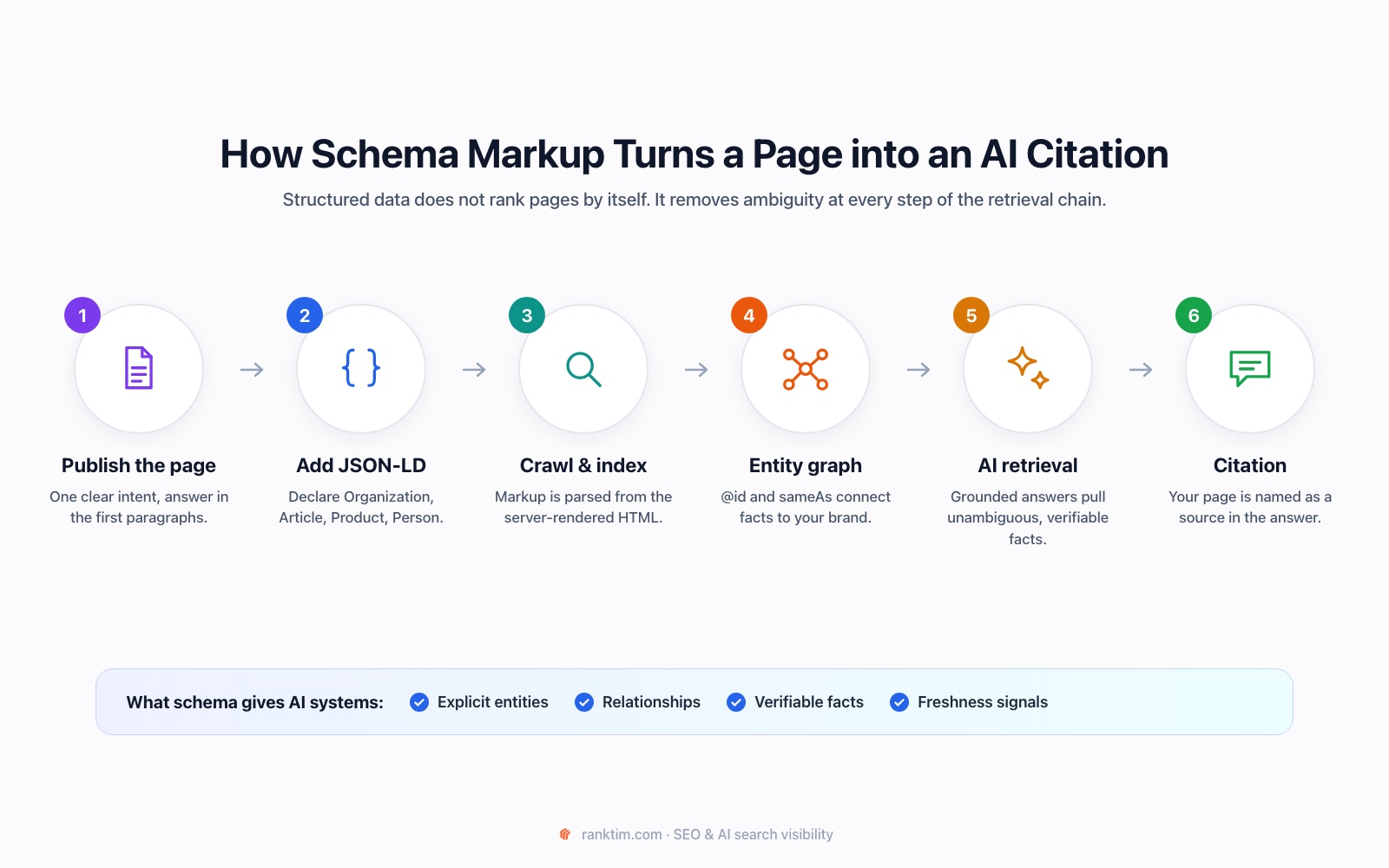
- You declare entities. Organization, Person, Product, Article: each one becomes an explicit object instead of something a parser has to infer from prose.
- Search engines parse and store those facts. They connect your markup to their knowledge graph through identifiers like @id and sameAs.
- AI systems retrieve grounded content. When Google, Bing or Perplexity build an answer, they pull from indexed pages. Clear, consistent facts are easier to verify and quote.
- Ambiguity drops. A page that states "price: 49 EUR, author: Jane Doe, publisher: Acme Ltd" in markup that matches the visible text is a safer source than a page where those facts are buried in a paragraph.
Think of schema as a trust and clarity layer, not a ranking lever.
The Schema Types That Matter Most for AI Visibility
You do not need fifty schema types. You need a handful implemented correctly and consistently across the site.
| Schema Type | What It Tells AI Systems | Where to Use It | Priority |
|---|---|---|---|
| Organization | Who your brand is: name, logo, URL, contact details, official profiles via sameAs | Homepage (once, referenced everywhere via @id) | High |
| Article / BlogPosting | Headline, author, publisher, datePublished and dateModified | Every blog post, guide and news page | High |
| Person | The real expert behind the content, with credentials and profiles | Author pages, linked from Article.author | High |
| Product + Offer | Price, currency, availability, brand, ratings | Product and pricing pages | High |
| FAQPage | Explicit question and answer pairs | Pages with a genuine visible FAQ section | Medium |
| BreadcrumbList | Where a page sits in your topical hierarchy | All pages below the homepage | Medium |
| LocalBusiness | Address, opening hours, service area | Businesses with physical locations | Situational |
| SoftwareApplication | App category, operating system, pricing | SaaS and app landing pages | Situational |
A note on FAQPage and HowTo in 2026
In 2023 Google restricted FAQ rich results to a small set of well-known government and health websites and removed HowTo rich results entirely. That changed the visual reward in Google's results, but it did not make the markup useless. FAQPage is still valid schema.org vocabulary, still parsed, and still a clean way to express question and answer pairs. Use it where you genuinely have a visible FAQ. Do not add it to pages just to chase a rich result that most sites will no longer get.
Build an Entity Graph, Not Isolated Snippets
The most common schema mistake is not a syntax error. It is disconnected markup: an Article on one page, an Organization on another, a Person somewhere else, with nothing linking them together.
AI systems reason about entities and relationships. Your markup should describe one connected graph:
- Organization (defined once, with a stable @id like https://yourbrand.com/#organization)
- ↳ publishes every Article (publisher references the same @id)
- ↳ employs the Person who wrote it (author references the person's @id)
- ↳ offers the Product on your pricing page (brand references the organization)
Two properties do most of the work:
- @id gives each entity a permanent identifier you can reference from any page, so search engines understand that the "RankTim" on your blog and the "RankTim" on your pricing page are the same thing.
- sameAs links your entity to its official profiles elsewhere: LinkedIn, Crunchbase, Wikipedia or Wikidata, G2, YouTube, GitHub. This is how machines confirm that your brand is a real, consistent entity across the web.
Here is a compact example of an Article that plugs into that graph:
<script type="application/ld+json">
{
  "@context": "https://schema.org",
  "@graph": [
    {
      "@type": "Organization",
      "@id": "https://yourbrand.com/#organization",
      "name": "YourBrand",
      "url": "https://yourbrand.com",
      "logo": "https://yourbrand.com/logo.png",
      "sameAs": [
        "https://www.linkedin.com/company/yourbrand",
        "https://www.crunchbase.com/organization/yourbrand"
      ]
    },
    {
      "@type": "Person",
      "@id": "https://yourbrand.com/team/jane-doe#person",
      "name": "Jane Doe",
      "jobTitle": "Head of SEO",
      "sameAs": ["https://www.linkedin.com/in/janedoe"]
    },
    {
      "@type": "BlogPosting",
      "headline": "Schema Markup for AI Search",
      "datePublished": "2026-10-05",
      "dateModified": "2026-10-05",
      "author": { "@id": "https://yourbrand.com/team/jane-doe#person" },
      "publisher": { "@id": "https://yourbrand.com/#organization" },
      "about": ["Structured data", "AI search"]
    }
  ]
}
</script>
The about and mentions properties are underused. They let you state explicitly which topics and entities a page covers, which helps systems that match content to the sub-questions behind a prompt.
Make Sure AI Crawlers Can Actually Read Your Markup
This is where many technically "correct" implementations fail silently.
Render JSON-LD on the server. Googlebot renders JavaScript, but most AI crawlers do not. An analysis of AI crawler traffic published by Vercel found that the crawlers behind ChatGPT and Claude fetch JavaScript files but do not execute them. If your schema is injected by a tag manager or a client-side script, Google may see it while GPTBot, ClaudeBot and PerplexityBot never do. Put the script tag in the HTML that your server returns.
Allow the crawlers you want to be cited by. Check robots.txt for GPTBot, OAI-SearchBot, ClaudeBot, PerplexityBot and Google-Extended. Blocking them is a legitimate business choice, but it should be a deliberate one, not an accident left by a security plugin.
Keep markup and visible content identical. If the markup says 49 EUR and the page says 59 EUR, you have created exactly the kind of conflict that makes a source unreliable. Google explicitly treats markup that misrepresents visible content as a spam signal.
Keep dateModified honest. Update it when the content materially changes, not on every deploy. AI systems favour fresh sources, and inflated dates erode trust when the content is clearly old.
For a broader view of how to expose your site to AI systems, pair schema with an llms.txt file, which gives language models a curated map of your most important pages.
Generate valid JSON-LD in under a minute
RankTim's free Schema Markup Generator builds Organization, Article, FAQPage and Product markup from your page, ready to paste into your HTML.
Open the Schema GeneratorA Step-by-Step Implementation Plan
Step 1: Inventory your page templates. Most sites have five to ten templates: homepage, blog post, product, category, pricing, author, location. Schema is implemented per template, not per page.
Step 2: Map one primary type to each template. Homepage gets Organization (and WebSite). Blog posts get BlogPosting. Product pages get Product with Offer. Author pages get Person.
Step 3: Define your core entities once. Create the Organization and key Person entities with stable @id values and complete sameAs arrays. Every other piece of markup references them.
Step 4: Generate and validate. Use a generator for the first draft, then validate with Google's Rich Results Test and the Schema.org validator. Fix every error and review every warning.
Step 5: Ship server-side and verify in the raw HTML. View the page source (not the rendered DOM in DevTools) and confirm the JSON-LD is there.
Step 6: Monitor. Check the Enhancements reports in Google Search Console for markup errors, and track whether AI engines start citing the pages you marked up.
Common Schema Mistakes That Hurt AI Visibility
| Mistake | Why It Hurts | Fix |
|---|---|---|
| Schema injected only via JavaScript | Invisible to most AI crawlers | Render JSON-LD in the server HTML |
| Markup that contradicts the page | Creates conflicting facts and can trigger manual actions | Generate markup from the same data source as the page |
| Author as a plain text string | No link to a real, verifiable expert | Use a Person entity with @id, jobTitle and sameAs |
| Several conflicting Organization blocks | Machines cannot tell which version is canonical | One Organization with a single @id, referenced everywhere |
| FAQ markup for questions not shown on the page | Violates guidelines and adds no trust | Mark up only visible Q&A content |
| Missing offers.price on product pages | AI shopping answers skip products without clear prices | Include price, priceCurrency and availability |
How to Measure Whether Schema Is Working
Schema is infrastructure, so measure it the way you measure infrastructure: coverage first, then outcomes.
- Coverage: the percentage of pages per template with valid, server-rendered markup and zero errors.
- Classic search outcomes: rich result impressions and click-through rate in Search Console, where eligible.
- AI search outcomes: how often your pages are cited in AI Overviews, ChatGPT, Perplexity and Gemini for the prompts that matter to you, before and after implementation.
The last one is the hardest to see without tooling, because AI answers change from one run to the next. You need to run the same prompts repeatedly across models and track citation frequency over time. If you want to understand the referral side as well, set up LLM traffic tracking in GA4.
Audit and Fix Your Schema with RankTim
RankTim brings the whole loop into one place. The AEO Audit inside the GEO / AEO Tracker scans your pages for the signals AI engines rely on: Organization and Article schema, author entities, missing FAQ or Product markup, AI crawler access in robots.txt, and markup that only appears after JavaScript runs. The Schema Markup Generator then produces valid JSON-LD for the gaps it finds.
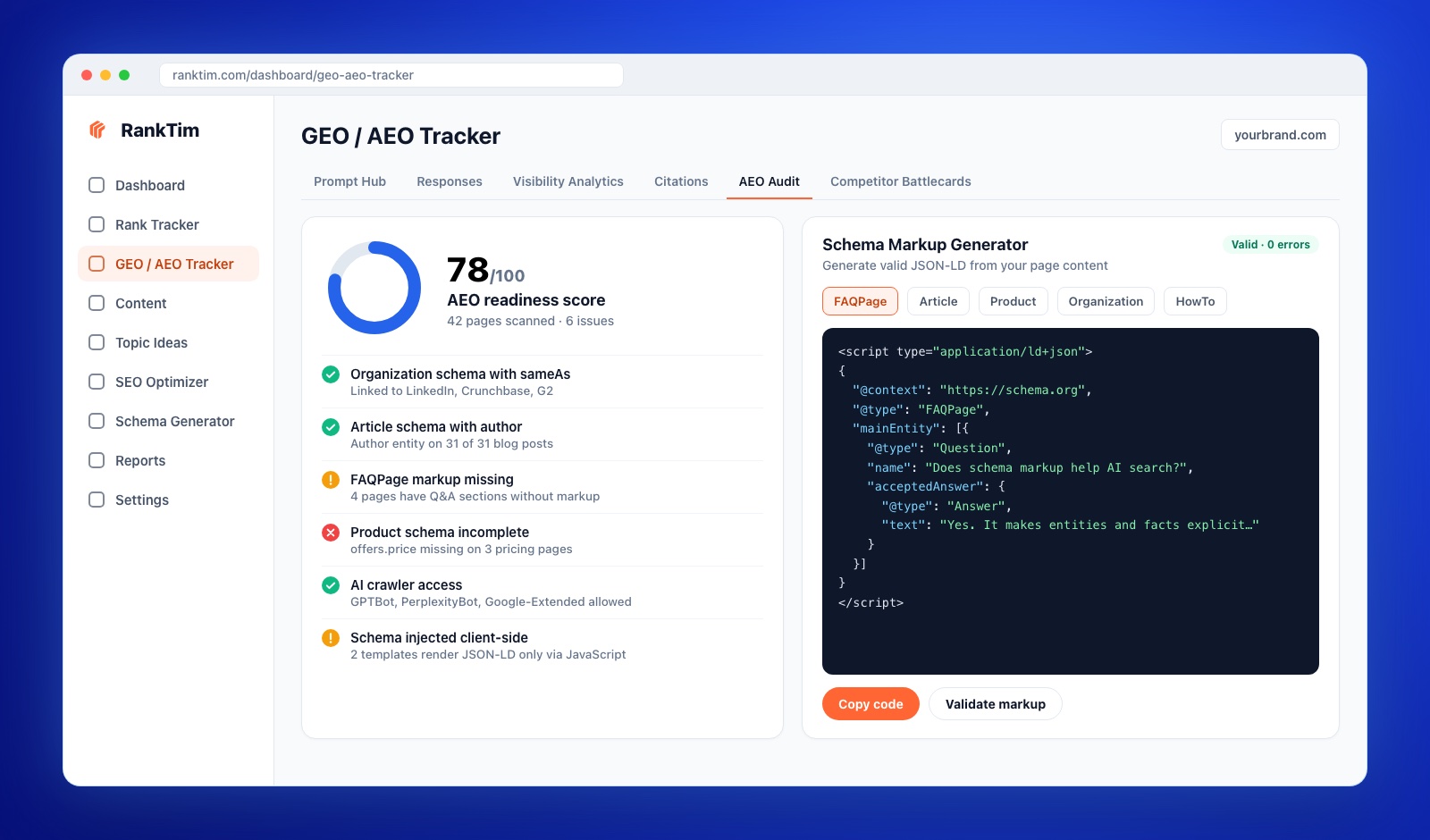
Once the fixes are live, the same tracker monitors prompts across ChatGPT, Gemini, Perplexity, Copilot and Google AI, so you can see whether the pages you improved actually start appearing as cited sources, and how your share of voice compares to competitors.
Frequently Asked Questions
Is schema markup a ranking factor for AI Overviews?
Not directly. Google states that no special markup is required for AI features. Schema helps search engines understand your content and entities, which supports the classic rankings that AI Overviews draw from and reduces ambiguity when your content is used as a source.
Which schema format should I use: JSON-LD, Microdata or RDFa?
JSON-LD. Google recommends it, it is easy to maintain separately from your HTML layout, and it is the format most generators and CMS plugins produce.
Do ChatGPT and Perplexity read schema markup?
They read the HTML their crawlers fetch, and JSON-LD in that HTML is plain structured text they can parse. Because most AI crawlers do not execute JavaScript, markup must be present in the server-rendered HTML to be seen at all.
Should I still use FAQPage schema after Google limited FAQ rich results?
Yes, where the page has a real, visible FAQ. You will probably not get the rich result, but the markup still expresses clear question and answer pairs that machines can parse.
How long does it take to see results from schema markup?
Search engines typically process new markup within days to a few weeks after recrawling. Effects on AI citations are slower and depend on your overall authority, so measure over two to three months rather than days.
Structured data is not a shortcut. It is the difference between a page that machines have to interpret and a page that tells them exactly what is true. In an AI-first search landscape, being unambiguous is a competitive advantage.
See If AI Engines Actually Cite Your Pages
RankTim audits your schema and AI crawler access, then tracks whether ChatGPT, Gemini, Perplexity and Google AI Overviews mention and cite your brand.
Start Tracking for Free
Catalin Dinca
Written by Catalin Dinca