

AI Crawlers and robots.txt in 2026: Which Bots to Allow for AI Search Visibility
 Catalin Dinca
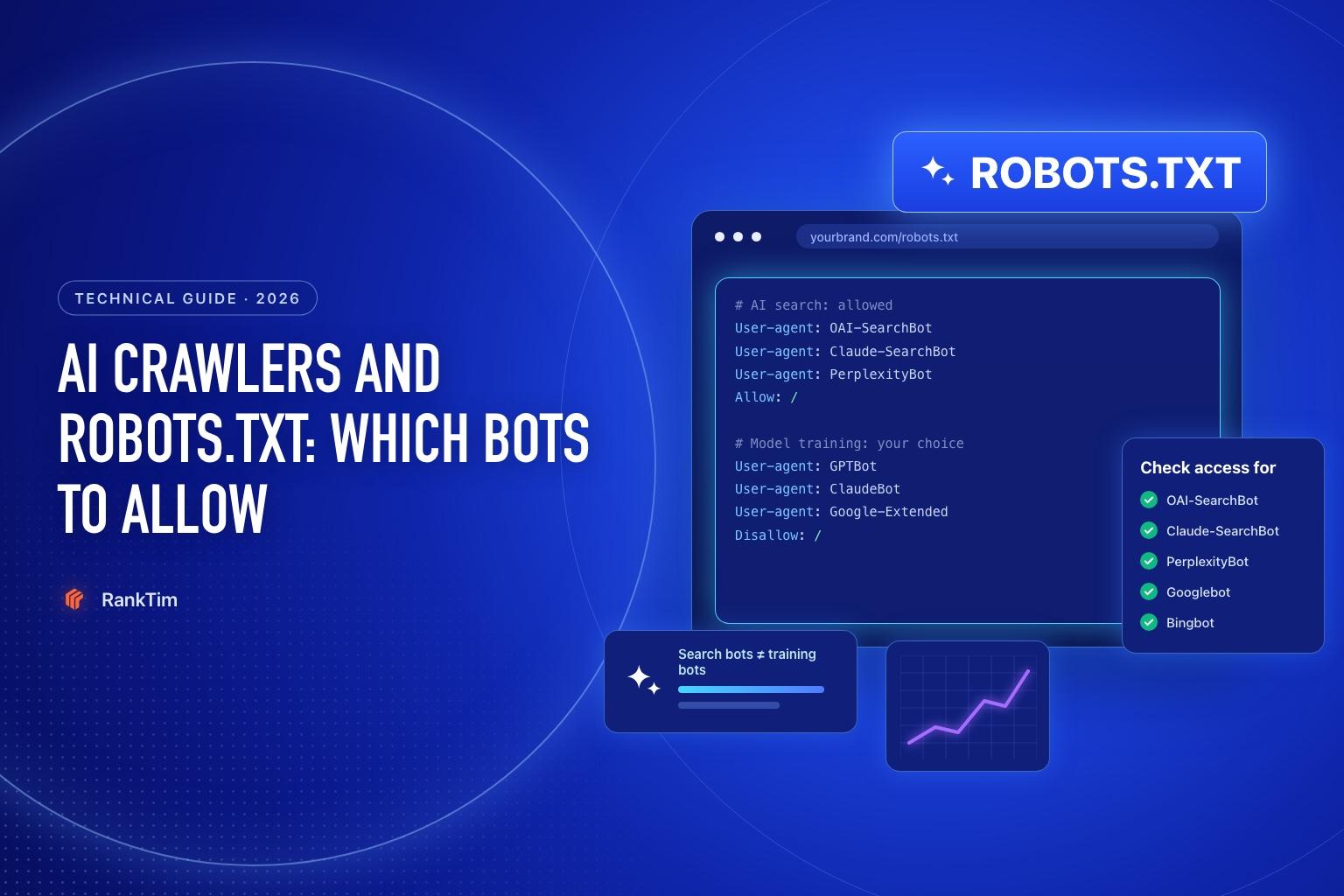
A few years ago, robots.txt mostly mattered for Googlebot and Bingbot. Today, a single website may be visited by a dozen bots from OpenAI, Anthropic, Perplexity, Google and others, and they don't all do the same job. Some build the search indexes behind AI answers. Some collect content to train future models. Others fetch a page only because a user asked an assistant about it.
That distinction matters. If you block a search crawler, your pages may stop appearing in that platform's AI answers. If you block a training crawler, you opt out of future model training, usually without affecting search visibility. Many sites get this wrong in both directions: they block everything "AI" and lose visibility, or they never check and discover their CDN has been blocking AI bots for months.
This guide explains what each major AI crawler does, how robots.txt applies to it according to the vendors' own documentation and how to choose a configuration that matches your goals.
TL;DR
- AI bots have three different jobs: search indexing (for example OAI-SearchBot, Claude-SearchBot, PerplexityBot), model training (GPTBot, ClaudeBot, Google-Extended, CCBot) and user-triggered fetching (ChatGPT-User, Claude-User, Perplexity-User).
- Allow search crawlers if you want AI visibility. OpenAI states that sites that opt out of OAI-SearchBot won't be shown in ChatGPT search answers, though they can still appear as navigational links.
- Blocking training bots is a business decision, not an SEO requirement. Google-Extended, for example, doesn't affect Google Search, AI Overviews or AI Mode.
- Check your CDN and firewall, not just robots.txt. Bot protection rules can block AI crawlers even when robots.txt allows them.
- Don't expect llms.txt to fix anything in Google. Google says it ignores AI text files and special markup for Search.
- Measure after you change anything: track AI mentions and citations, plus Bing's AI Performance and Search Console's generative AI reports.
Table of Contents
- Why robots.txt Matters for AI Visibility
- The Three Kinds of AI Bots
- AI Crawler Reference Table
- Step 1: Decide What You Want
- Step 2: Audit Your Current robots.txt
- Step 3: Choose a robots.txt Configuration
- Step 4: Check Your CDN, Firewall and Hosting
- Step 5: Verify Crawlers in Your Server Logs
- Step 6: Don't Over-Invest in llms.txt
- Step 7: Monitor the Impact
- Common Mistakes
- How Rank Tim Helps
- FAQ
- Sources
- Recommended Articles
Why robots.txt Matters for AI Visibility
AI assistants that search the web need two things before they can cite your page: they must be allowed to crawl it, and they must be able to read it. robots.txt is the first gate.
Each AI company publishes its own user agents and explains how its systems respect robots.txt. The rules aren't identical across companies, which is why a single "block AI" rule can have side effects you didn't intend. For example, OpenAI notes that each of its robots.txt settings is independent: you can allow OAI-SearchBot for search while disallowing GPTBot for training.
For Google, the picture is different again. AI Overviews and AI Mode are part of Google Search, so they're controlled by Googlebot and your normal snippet settings, not by a separate AI crawler. Our guide on getting cited in Google AI Overviews and AI Mode covers that side in detail.
The Three Kinds of AI Bots
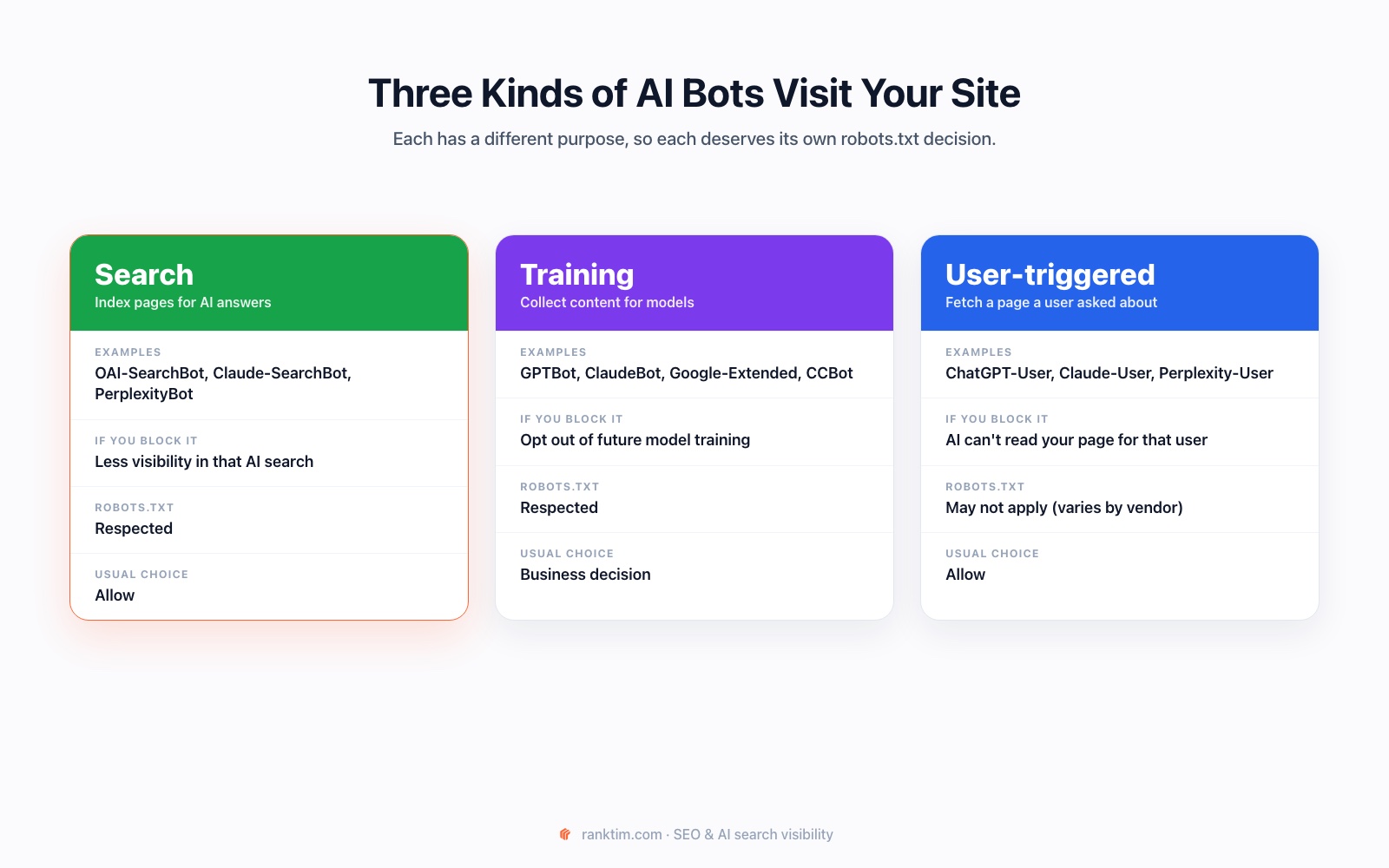
- Search crawlers build the index an AI assistant searches when it answers questions. Blocking them reduces your visibility in that assistant's answers.
- Training crawlers collect public content that may be used to train future models. Blocking them signals that you don't want your content used for training.
- User-triggered fetchers visit a page because a user asked the assistant to read or summarize it. Some vendors say robots.txt may not apply to these, because the request comes from a person.
AI Crawler Reference Table
This table summarizes what each vendor documents about its main bots. Always check the vendor pages linked in the Sources section, as they change over time.
| Company | User agent | What it does | robots.txt |
|---|---|---|---|
| OpenAI | OAI-SearchBot | Surfaces websites in ChatGPT search features | Respected. Changes can take about 24 hours to apply to search |
| OpenAI | GPTBot | Crawls content that may be used to train foundation models | Respected |
| OpenAI | ChatGPT-User | Visits pages for user actions in ChatGPT and Custom GPTs | May not apply, because a user initiates it |
| OpenAI | OAI-AdsBot | Checks the safety of pages submitted as ChatGPT ads | Only visits ad landing pages |
| Anthropic | ClaudeBot | Collects content that could contribute to model training | Respected, including Crawl-delay |
| Anthropic | Claude-SearchBot | Improves the quality of Claude's search results | Respected |
| Anthropic | Claude-User | Fetches pages when users ask Claude questions | Respected, per Anthropic |
| Perplexity | PerplexityBot | Surfaces and links websites in Perplexity search; not used for training | Managed with robots.txt |
| Perplexity | Perplexity-User | Visits pages to answer a user's question | Generally ignores robots.txt |
| Googlebot | Crawls for Google Search, including AI Overviews and AI Mode | Respected | |
| Google-Extended | A control token for Gemini training and grounding in Gemini Apps and Vertex AI; no separate crawler | Respected; doesn't affect Google Search | |
| Common Crawl | CCBot | Builds an open web archive that many AI developers use | Respected |
Microsoft's AI experiences, such as Copilot and AI summaries in Bing, rely on Bing. In its announcement of AI Performance reporting, Microsoft says Bing "respects all content owner preferences expressed through robots.txt and other supported control mechanisms", so keep Bingbot allowed if you want visibility there.
Step 1: Decide What You Want
Before editing anything, answer two questions:
- Do you want to appear in AI answers and AI search? For most businesses, the answer is yes. Being recommended by ChatGPT, Claude or Perplexity is a new discovery channel. Allow the search crawlers and user fetchers.
- Are you comfortable with your content being used for model training? This is a business and legal decision. Publishers that sell content often block training bots; many companies allow them because being well represented in models helps the brand.
The two decisions are independent. You can be fully visible in AI search while opting out of training.
Step 2: Audit Your Current robots.txt
Open yourdomain.com/robots.txt and look for:
- a blanket
User-agent: *withDisallow: /left over from a staging site - groups that block specific AI bots, sometimes added by plugins or a previous agency
- old, misspelled or outdated user agent names
- a missing
Sitemap:line
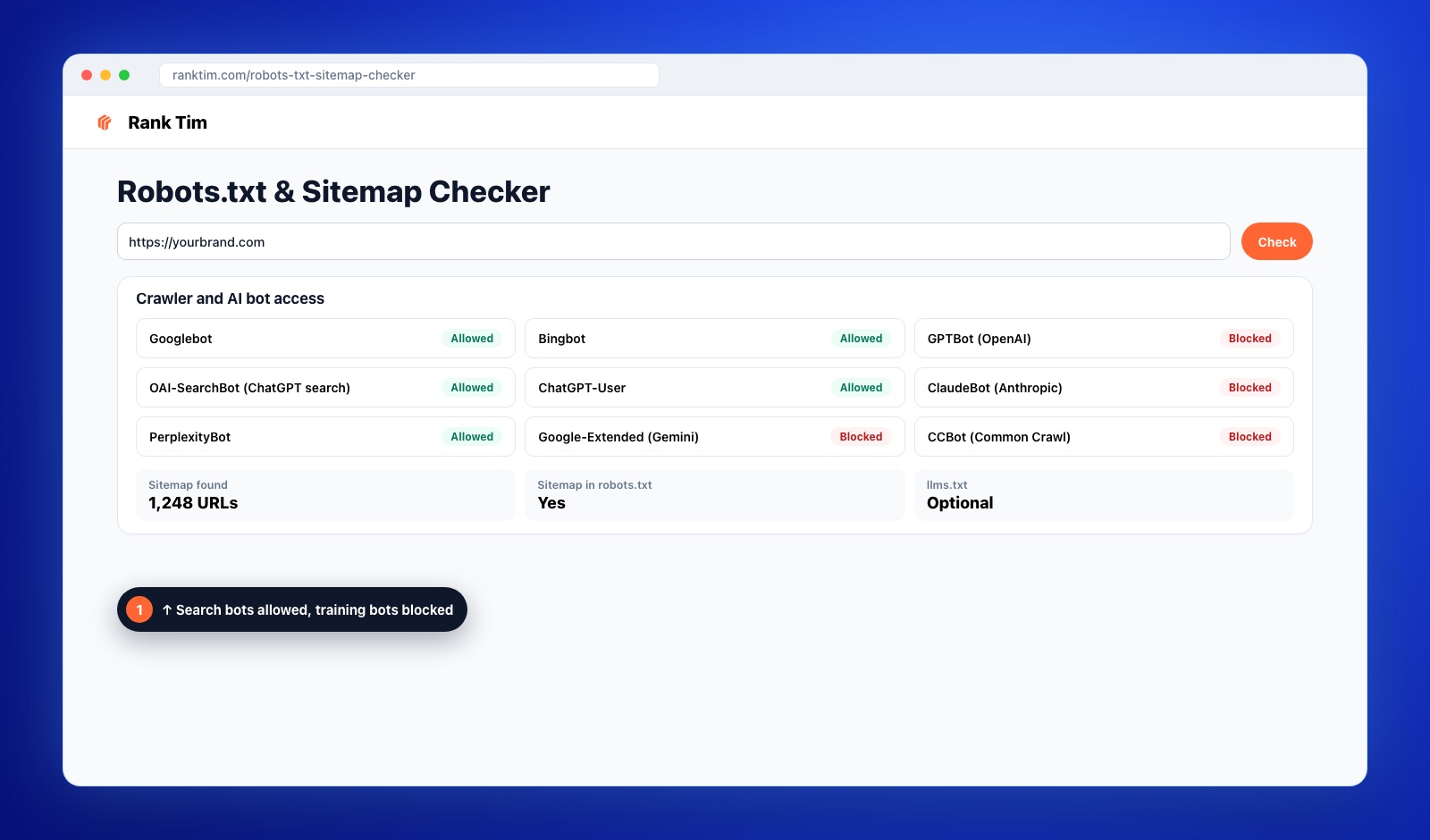
A faster option is the free Robots.txt & Sitemap Checker. It reads your file and shows, bot by bot, whether each crawler is allowed, and checks your sitemap at the same time.
Step 3: Choose a robots.txt Configuration
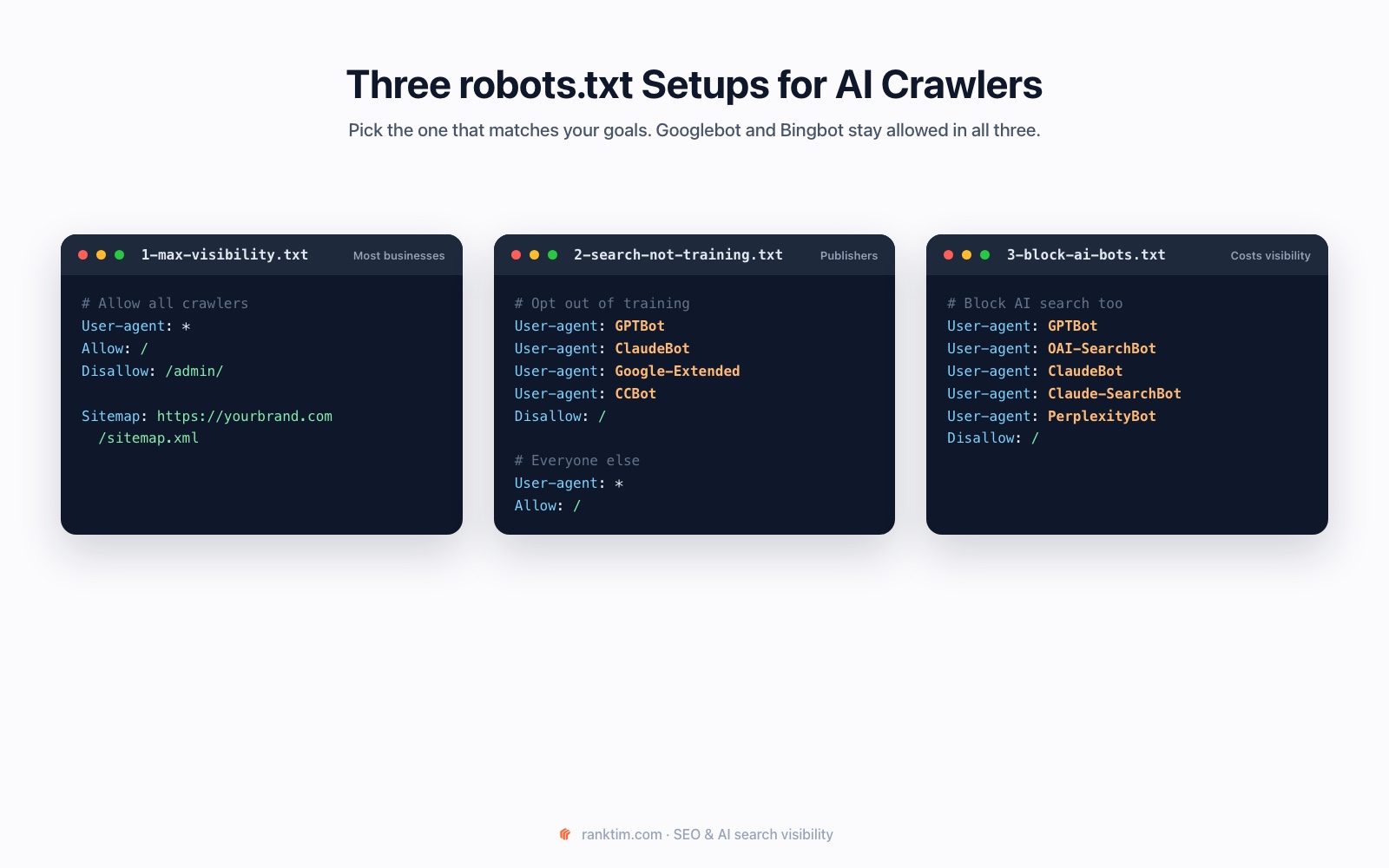
Most sites fit one of three setups. In all of them, Googlebot and Bingbot stay allowed.
Setup 1: Maximum visibility
For most businesses that want to be found and recommended:
User-agent: *
Allow: /
Disallow: /admin/

Sitemap: https://yourbrand.com/sitemap.xml
Setup 2: AI search yes, model training no
For publishers and brands that want AI visibility but not training use:
# Opt out of model training
User-agent: GPTBot
User-agent: ClaudeBot
User-agent: Google-Extended
User-agent: CCBot
Disallow: /

# Search crawlers and everyone else
User-agent: *
Allow: /

Sitemap: https://yourbrand.com/sitemap.xml
Setup 3: Block AI bots
Only if you accept losing visibility in AI search:
User-agent: GPTBot
User-agent: OAI-SearchBot
User-agent: ClaudeBot
User-agent: Claude-SearchBot
User-agent: PerplexityBot
Disallow: /Step 4: Check Your CDN, Firewall and Hosting
robots.txt is a request, not a lock. The opposite problem is also common: your robots.txt allows AI crawlers, but your infrastructure blocks them.
- CDN and WAF rules: many CDNs and security services offer one-click "block AI bots" settings. Check whether they're on and whether they match your robots.txt decision.
- Rate limiting: aggressive limits can return errors to legitimate crawlers.
- Login walls and geo-blocking: content behind them is invisible to bots.
- JavaScript-only content: if the main text only appears after scripts run, some crawlers may see an empty page. Our guide on optimizing your website for AI search covers rendering in detail.
Check which bots can reach your site, free
The Rank Tim Robots.txt & Sitemap Checker reads your robots.txt and shows, bot by bot, whether Googlebot, Bingbot, GPTBot, OAI-SearchBot, ChatGPT-User, ClaudeBot, PerplexityBot, Google-Extended and CCBot are allowed.
Check My robots.txtStep 5: Verify Crawlers in Your Server Logs
User agent strings can be faked. To confirm that a visit really comes from an AI company, compare the IP address with the ranges vendors publish:
- OpenAI publishes separate IP lists for OAI-SearchBot, GPTBot and ChatGPT-User.
- Anthropic publishes a list of its crawler IPs.
- Perplexity publishes IP ranges for PerplexityBot and Perplexity-User.
Look at your logs for each bot's requests, the status codes they receive and which pages they request. A crawler that only ever gets 403 or 429 responses is effectively blocked, whatever robots.txt says.
Step 6: Don't Over-Invest in llms.txt
An llms.txt file offers AI tools a curated, text-only guide to your site. Some tools may use it, but it isn't a standard that the major search platforms rely on. Google is explicit: you don't need AI text files, special markup or Markdown versions of pages to appear in Google Search, and Google Search ignores them.
If you already have one, keep it accurate. If you don't, fix crawler access, indexing and content quality first.
Step 7: Monitor the Impact
After any change, measure whether visibility moves:
- AI answers: track a fixed set of prompts and watch whether your brand is mentioned and your pages are cited.
- Bing Webmaster Tools AI Performance: shows citations of your pages in Copilot, AI summaries in Bing and select partner experiences.
- Search Console: the Generative AI performance report shows impressions in AI Overviews and AI Mode.
- GA4: the AI Assistant channel shows visits from assistants such as ChatGPT, Gemini and Copilot.
Our companion guide on how to measure AI search visibility shows how to combine these into one monthly report.
Common Mistakes
- Blocking OAI-SearchBot when you meant to block GPTBot. You lose ChatGPT search visibility without gaining anything.
- Assuming Google-Extended controls AI Overviews. It doesn't; AI Overviews and AI Mode follow Googlebot and snippet settings.
- Forgetting subdomains. Each subdomain needs its own robots.txt.
- Leaving staging rules in production. A single
Disallow: /can hide an entire site. - Never re-checking. CMS updates, plugins and CDN changes can silently alter access.
How Rank Tim Helps
Crawler access is the first link in a chain: access, then indexing, then content that deserves to be cited, then measurement. Rank Tim covers each link:
- Free Robots.txt & Sitemap Checker: shows, bot by bot, whether Googlebot, Bingbot, GPTBot, OAI-SearchBot, ChatGPT-User, ClaudeBot, PerplexityBot, Google-Extended and CCBot can access your site, and validates your sitemap. Try it here.
- AEO Audit: in Site Audit, checks discovery signals such as robots.txt, sitemaps and llms.txt, plus structured data, content quality, technical health and server-side rendering.
- AI visibility tracking: runs your prompts across ChatGPT, Google AI Mode, Gemini, Perplexity, Copilot and Grok, so you can see whether a robots.txt change is followed by more mentions and citations.
The checker gives you a quick answer for free; the full platform shows whether access is turning into visibility. You can also start with a free AI visibility audit.
FAQ
Should I block GPTBot?
Only if you don't want your content used to train OpenAI's models. Blocking GPTBot doesn't remove you from ChatGPT search; that's controlled by OAI-SearchBot, which OpenAI treats as a separate setting.
What is the difference between GPTBot and OAI-SearchBot?
GPTBot crawls content that may be used to train OpenAI's foundation models. OAI-SearchBot surfaces websites in ChatGPT's search features. OpenAI says the settings are independent, so you can allow one and block the other.
Does blocking Google-Extended remove my site from AI Overviews?
No. Google states that Google-Extended doesn't affect inclusion or ranking in Google Search. AI Overviews and AI Mode are part of Search and are controlled by Googlebot and your snippet settings, such as nosnippet.
Do AI crawlers respect robots.txt?
The major search and training crawlers from OpenAI, Anthropic, Perplexity and Google document that they follow robots.txt. User-triggered fetchers are different: OpenAI says robots.txt rules may not apply to ChatGPT-User, and Perplexity says Perplexity-User generally ignores them.
How long does a robots.txt change take to work?
It depends on the crawler. OpenAI says it can take about 24 hours for ChatGPT search to reflect a robots.txt update. Other systems recrawl on their own schedules, so re-check after a few days.
Do I need an llms.txt file to appear in AI search?
No. Google says it ignores AI text files for Search. Some tools may read llms.txt, but crawler access, indexing and useful content matter far more.
Which AI crawlers should an online store allow?
Most stores benefit from allowing search crawlers and user fetchers, because shoppers increasingly ask assistants for product recommendations. Whether to allow training crawlers is a separate decision.
Sources
- OpenAI: Overview of OpenAI crawlers
- Anthropic: Does Anthropic crawl data from the web, and how can site owners block the crawler?
- Perplexity: Perplexity crawlers
- Google Search Central: Google's common crawlers (Google-Extended)
- Google Search Central: Optimizing for generative AI features on Google Search
- Google Search Central: AI features and your website
- Microsoft Bing: Introducing AI Performance in Bing Webmaster Tools
Recommended Articles
- How to Measure AI Search Visibility: Search Console, Bing AI Performance and GA4
- How to Choose an AI Visibility Tool: 12 Criteria and a Buyer's Scorecard
- How to Optimize Your Website for AI Search
- What Is GEO? Generative Engine Optimization Explained
- How to Get Cited in Google AI Overviews and AI Mode
Make Sure AI Can Find You, Then Measure It
Audit crawler access, fix what blocks AI search and track how ChatGPT, Google AI, Gemini, Perplexity and Copilot mention and cite your brand.
Start for Free
Catalin Dinca
Written by Catalin Dinca