

How to Choose an AI Visibility Tool in 2026: 12 Criteria and a Buyer's Scorecard
 Catalin Dinca
As AI assistants became a real discovery channel, a new category of software appeared: AI visibility tools, also called GEO or AI search tracking tools. They run prompts across assistants like ChatGPT, Google AI Mode, Gemini and Perplexity and report how often your brand is mentioned, cited and recommended.
The category is young, and the tools differ more than their landing pages suggest. Some cover two platforms, others six. Some show the full answers behind every score; others only show a number. Some stop at monitoring; others help you fix what they find.
This guide gives you a practical way to compare them: 12 criteria, a weighted scorecard, the red flags to watch for, questions to ask vendors and a 14-day test plan you can run with your own prompts.
TL;DR
- Start from your use case. Decide which AI platforms, markets and prompts matter to your customers before comparing tools.
- Demand transparency. A good tool shows the full answers, the sources cited and how often prompts are run, not just a score.
- Check actionability. Monitoring is only useful if it leads to changes: content, technical fixes, outreach or PR.
- Avoid red flags: guaranteed AI rankings, results from a single run, hidden methodology and no access to raw data.
- Test before you commit. Run 20 to 30 of your real prompts for two weeks and compare results with manual checks.
- Compare total cost per useful insight, not just the monthly price: prompts, platforms, run frequency and markets all drive cost.
Table of Contents
- What an AI Visibility Tool Should Do
- Three Types of Solutions
- The 12 Criteria That Matter
- A Weighted Buyer's Scorecard
- Red Flags to Watch For
- Questions to Ask Vendors
- How to Run a 14-Day Trial
- What Drives the Price
- Where Rank Tim Fits
- FAQ
- Sources
- Recommended Articles
What an AI Visibility Tool Should Do
At minimum, an AI visibility tool should answer four questions:
- Are we mentioned? How often your brand appears in answers to prompts that matter.
- Are we cited? Which of your pages AI uses as sources, and which other sources it prefers.
- How are we described? Whether the AI describes your product, pricing and strengths accurately, and with what sentiment.
- Who wins instead? Which competitors appear where you don't, and why.
The better tools add a fifth: what should we do next? That might be a page to improve, a source to get listed on or a topic to cover. If you're new to the field, our guide to what GEO is explains the concepts these tools measure.
Three Types of Solutions
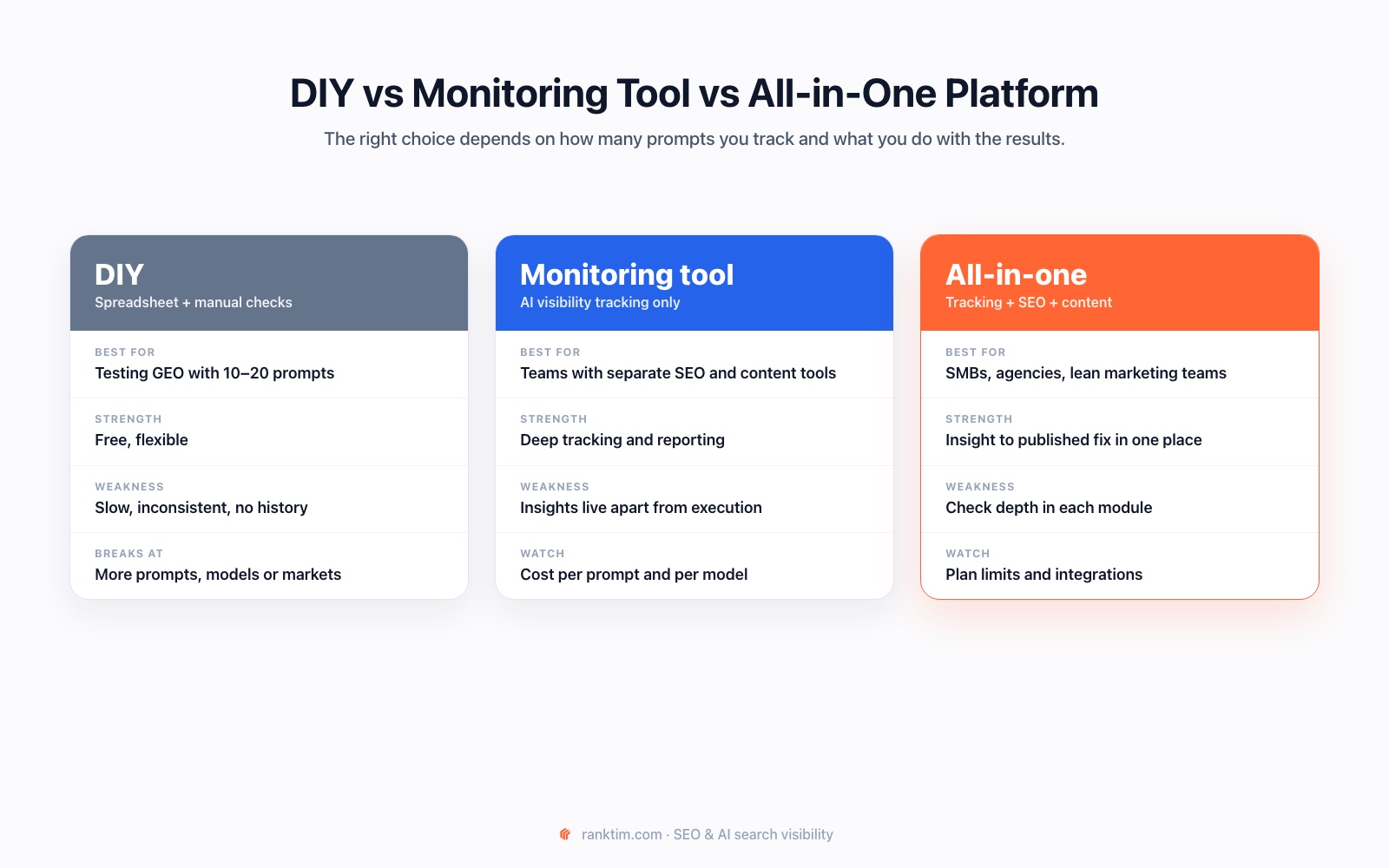
| Approach | Works best for | Main limitation |
|---|---|---|
| DIY: spreadsheet and manual checks | Testing GEO with 10 to 20 prompts before investing | Slow, inconsistent, hard to repeat and no history |
| Monitoring-only tool | Teams that already have separate SEO, content and analytics tools | Insights live apart from the tools where work gets done |
| All-in-one platform | SMBs, agencies and lean teams that want insight and execution together | Check the depth of each module, not just the feature list |
The 12 Criteria That Matter
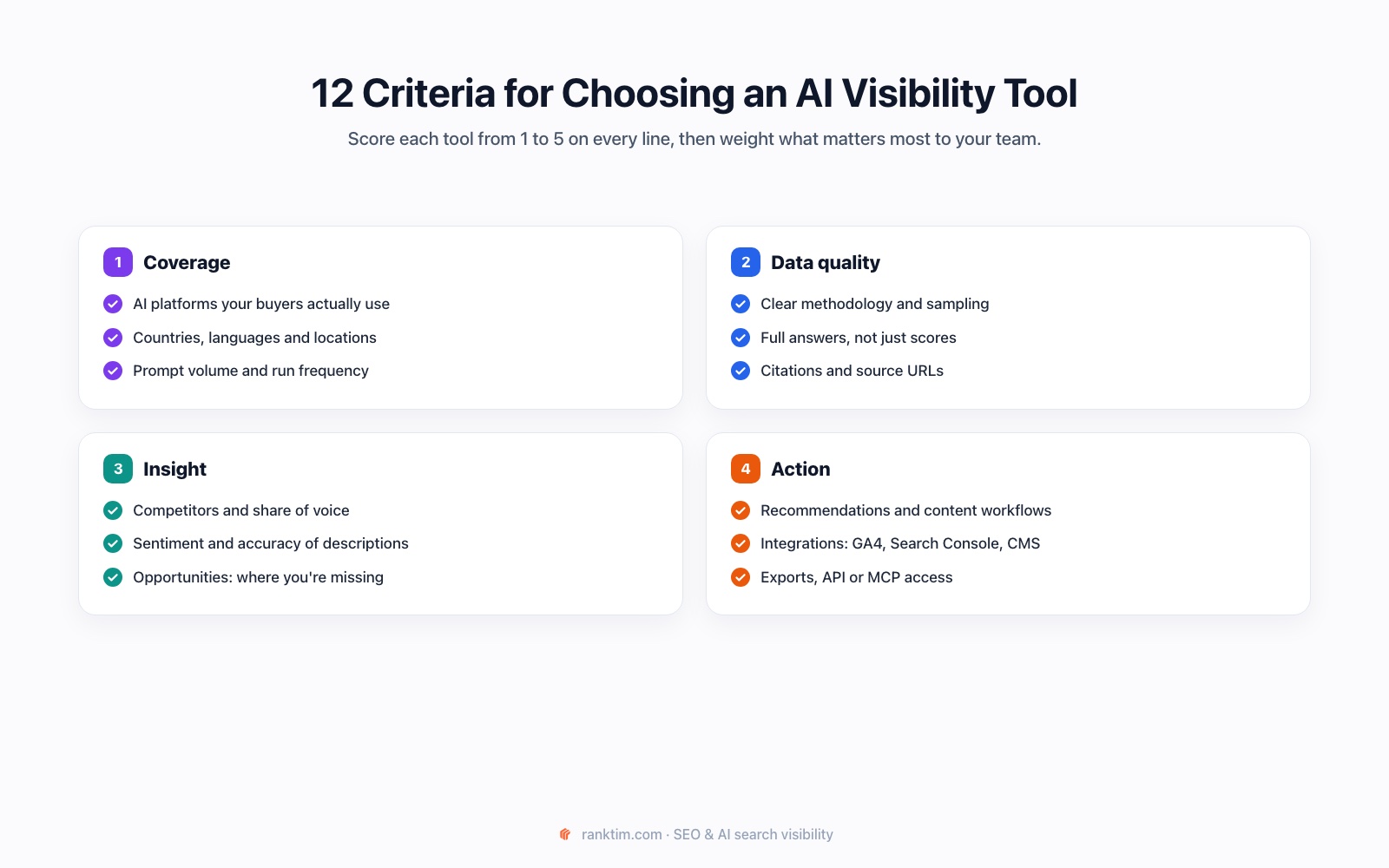
Coverage
1. AI platforms. List the assistants your customers actually use: ChatGPT, Google AI Overviews or AI Mode, Gemini, Perplexity, Copilot, Claude or Grok. Then check which ones each tool supports and how. Some tools query consumer interfaces; others use model APIs, which can answer differently from what users see.
2. Markets and languages. AI answers change by country and language. If you sell in Romania and Germany, a tool that only runs US English prompts will mislead you.
3. Prompt volume and frequency. How many prompts can you track, and how often are they run? Weekly runs are enough for most brands; fast-moving categories may need more.
Data Quality
4. Transparent methodology. The vendor should explain how prompts are run, from which locations, how often and how scores are calculated. AI answers vary, so a single run proves little.
5. Full answers, not just scores. You should be able to read the exact response behind every data point. Scores without answers can't be checked or acted on.
6. Citations and sources. Look for the URLs each answer cites, which of them are yours and which domains AI relies on in your category. Sources are where most of the actionable insight lives.
Insight
7. Competitors and share of voice. The tool should show which competitors appear for each prompt and how your share of mentions compares over time.
8. Sentiment and accuracy. Being mentioned negatively, or with outdated pricing, is a problem worth knowing about. Check whether the tool flags how you're described, not just whether you're named.
9. Opportunities. The best tools highlight gaps: prompts where competitors win, sources that cite them but not you and pages of yours that rank but are never cited.
Action
10. Recommendations and workflows. Can you go from an insight to a fix: a content brief, an updated page, a technical audit? Or do you need to export everything to other tools?
11. Integrations. Connections to Google Analytics and Search Console put AI visibility next to traffic and conversions. CMS integrations, such as WordPress or Shopify, shorten the path from plan to published page.
12. Data access. CSV exports, an API or MCP access let you build your own reports, feed dashboards and keep your history if you ever switch tools.
A Weighted Buyer's Scorecard
Score each tool from 1 to 5 on every criterion, multiply by the weight and add up the totals. Adjust the weights to your situation.
| Criterion | Suggested weight | Tool A (1–5) | Tool B (1–5) |
|---|---|---|---|
| AI platforms your customers use | 3 | ||
| Markets and languages | 2 | ||
| Prompt volume and frequency | 2 | ||
| Transparent methodology | 3 | ||
| Full answers | 3 | ||
| Citations and sources | 3 | ||
| Competitors and share of voice | 2 | ||
| Sentiment and accuracy | 2 | ||
| Opportunities | 2 | ||
| Recommendations and workflows | 2 | ||
| Integrations | 1 | ||
| Data access | 1 |
Red Flags to Watch For
- Guaranteed rankings or citations in ChatGPT. No one controls what AI assistants answer. Google's own guidance warns against shortcuts and inauthentic tactics.
- Scores without answers. If you can't see what the AI said, you can't verify the number.
- Single-run results. One answer is an anecdote. Ask how many runs a score is based on.
- Hidden methodology. No explanation of locations, frequency or how mentions are detected.
- No source data. Without cited URLs, you can't find out why competitors win.
- No way to export. Your history should belong to you.
Questions to Ask Vendors
- Which AI platforms do you query, and do you use the consumer interface or the API?
- From which countries and in which languages can prompts run?
- How often are prompts run, and how many runs make up a score?
- Can I see the full answer and every cited source behind each data point?
- How do you detect brand mentions, including misspellings and product names?
- How do you calculate share of voice and sentiment?
- What happens to my data and history if I cancel?
- What can I do inside the tool once I find a gap?
Test an AI visibility tool against your own prompts
Run your real prompts across ChatGPT, Google AI Mode, Gemini, Perplexity, Copilot and Grok, read the full answers and sources behind every score, and see which competitors win where you don't.
Start Your Free TrialHow to Run a 14-Day Trial
A short, structured test reveals more than any demo:
- Days 1–2: add 20 to 30 real prompts across your main products, including comparisons and "best for" questions. Add three to five competitors.
- Days 3–7: let the tool run. Manually check five prompts in each assistant and compare what you see with what the tool reports.
- Days 8–12: review sources and opportunities. Pick two gaps and ask: does the tool tell me what to do about them?
- Days 13–14: score the tool with the scorecard above and estimate the cost of tracking your full prompt set at the frequency you need.
Our tutorials on prompt research and tracking brand visibility in ChatGPT, Gemini and Perplexity help you build the prompt set.
What Drives the Price
Most AI visibility tools price on some combination of:
- the number of prompts tracked
- the number of AI platforms
- how often prompts run
- the number of markets or languages
- seats, projects or brands
A tool that looks cheap per month can become expensive once you add the platforms and frequency you need. Calculate the cost of your real setup, then compare it with what the tool lets you do with the results. And remember that first-party reports, such as Search Console's Generative AI performance report and Bing's AI Performance report, are free complements, not replacements. Our guide on how to measure AI search visibility shows how to combine them.
Where Rank Tim Fits
Rank Tim is an all-in-one platform: AI visibility tracking sits next to SEO, site audits and content tools, so insights turn into published changes in the same place. Here's how it maps to the criteria:
- Coverage: tracks prompts across ChatGPT, Google AI Mode, Gemini, Perplexity, Copilot and Grok.
- Data quality: shows the full answer and cited sources behind every data point, in AI Visibility → Answers and Citations.
- Insight: overview metrics for AI visibility, share of voice, ranking and sentiment; Opportunities for cited sources where you're missing; Competitors battlecards that summarize how AI describes each rival; and a ChatGPT Ads view of sponsored placements on your prompts.
- Action: Site Audit with an AEO Audit and page-level citation analysis, a Content Plan and AI article tools, and publishing to WordPress, Shopify, Webflow and Framer.
- Integrations and data access: Google Analytics and Search Console integrations, CSV exports and an MCP server.
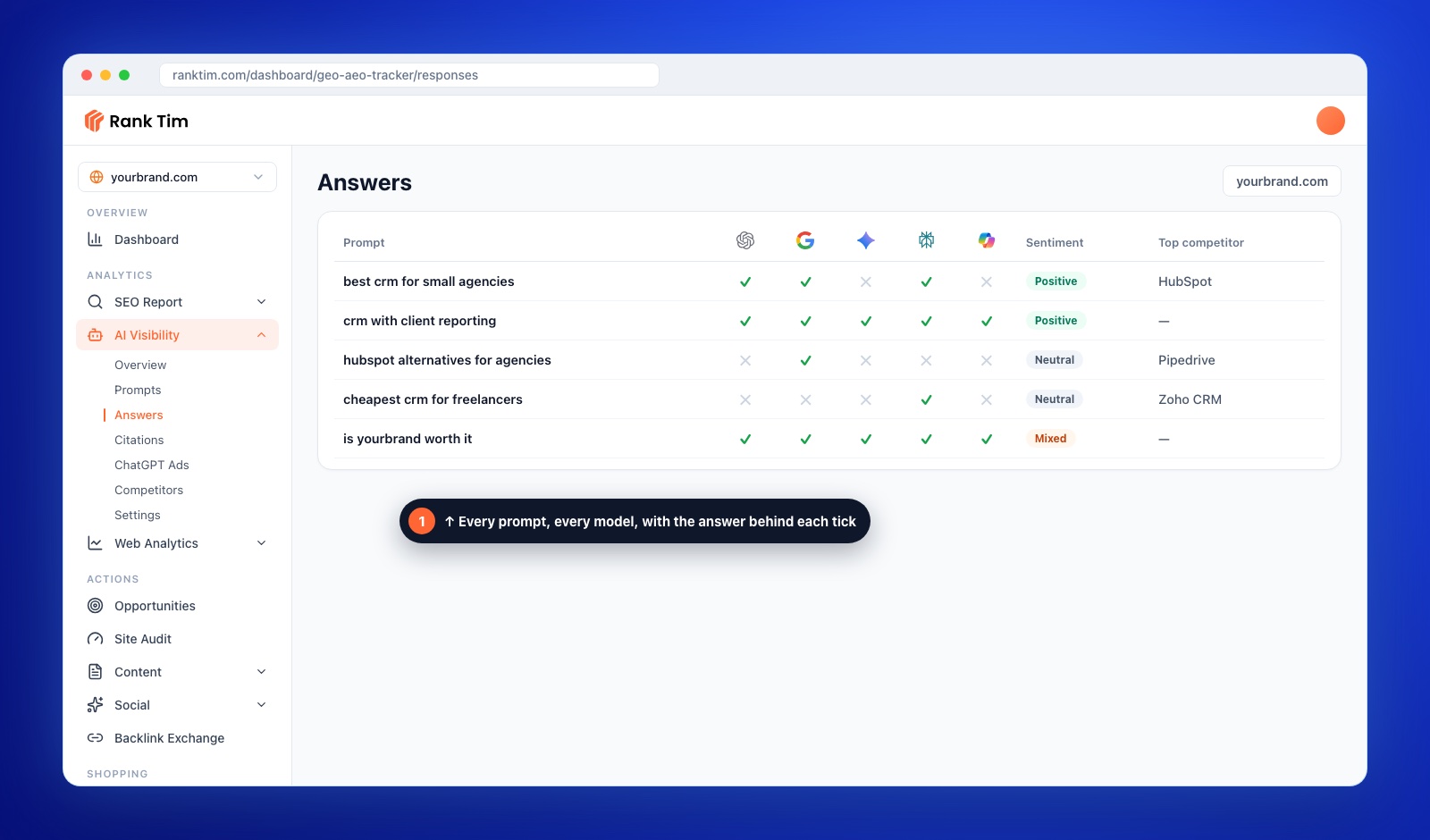
As with any tool, our visibility metrics describe a defined sample of prompts, not every AI conversation, and features vary by plan. The fairest test is the one described above: run your own prompts and judge the results. You can start with a free AI visibility audit or compare plans on the pricing page.
FAQ
What is an AI visibility tool?
It's software that runs prompts across AI assistants such as ChatGPT, Google AI Mode, Gemini and Perplexity and reports how often your brand is mentioned, which of your pages are cited, how you're described and which competitors appear.
Do I need an AI visibility tool or is manual checking enough?
Manual checks are fine for testing with 10 to 20 prompts. Once you track more prompts, platforms or markets, or need history and competitor data, manual checking becomes slow and inconsistent.
Which AI platforms should a tool cover?
The ones your customers use. For most businesses, that means ChatGPT and Google's AI features at minimum, plus Gemini, Perplexity and Copilot depending on your audience.
Can an AI visibility tool guarantee that ChatGPT recommends my brand?
No. No tool or agency controls AI answers. A good tool shows where you stand and what to improve; results depend on your content, reputation and competition.
How many prompts should I track?
Start with 20 to 50 prompts that reflect real buying questions across your main products, then expand. A focused, stable prompt set gives more reliable trends than hundreds of random prompts.
How is an AI visibility tool different from a rank tracker?
A rank tracker reports positions in search results for keywords. An AI visibility tool reports mentions, citations, sentiment and share of voice inside AI-generated answers. Many teams need both.
What's the difference between monitoring and an all-in-one platform?
Monitoring tools focus on tracking and reporting. All-in-one platforms also include tools to act on the findings, such as audits, content planning and publishing.
Sources
- Google Search Central: Optimizing for generative AI features on Google Search
- Google Search Console Help: Generative AI performance report
- Microsoft Bing: Introducing AI Performance in Bing Webmaster Tools
- OpenAI: Overview of OpenAI crawlers
- Aggarwal et al.: GEO: Generative Engine Optimization (arXiv)
Recommended Articles
- How to Measure AI Search Visibility: Search Console, Bing AI Performance and GA4
- AI Crawlers and robots.txt in 2026: Which Bots to Allow
- What Is GEO? Generative Engine Optimization Explained
- How to Find the Prompts Your Customers Ask AI
- Why Competitors Get Cited by ChatGPT and Your Brand Doesn't
From AI Visibility Data to Published Fixes
Track AI mentions and citations, audit your site for AI readiness, plan content around the gaps and publish to your CMS, all in one platform.
Start for Free
Catalin Dinca
Written by Catalin Dinca