

How to Analyze a Page for AI Citations: Find Out Why AI Does or Doesn't Use It
 Catalin Dinca
You have a page you're proud of. It ranks on the first page of Google, it answers the question well and it converts. Yet when you ask ChatGPT, Gemini or Google AI Mode the same question, the answer cites three other sites and never yours.
Brand-level tracking shows you that you're missing. It doesn't show you why a specific page isn't chosen. For that, you need to analyze the page itself: is it found, is it used as a source, how much of the answer does it support and what do the pages chosen instead do better?
This tutorial shows how to analyze a single page for AI citations, how to read the results and how to turn them into fixes.
Time needed: about 10 minutes per page for the analysis, plus the time to make the changes.
Three Things That Decide Whether AI Uses Your Page
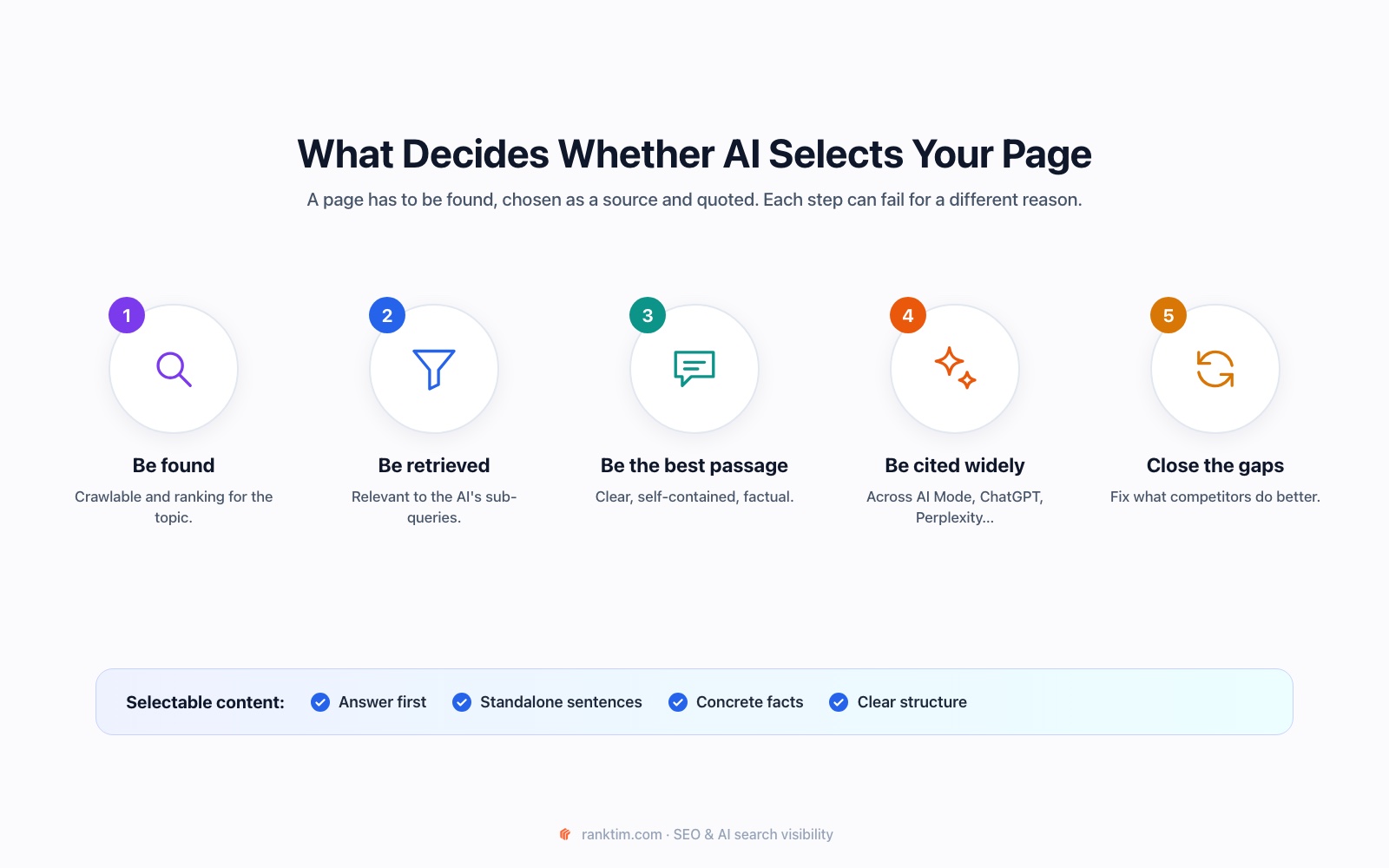
Before an AI answer cites your page, three things have to happen:
- It has to be found. AI systems that search the web rely on search results, so a page that doesn't rank for the topic is rarely considered. If query fan-out is involved, the page needs to show up for at least one of the sub-queries.
- It has to be chosen as a source. Among the pages retrieved, the system picks the ones with the clearest, most relevant passages.
- Its content has to be used. A page can be listed as a source but support only one sentence of the answer, or it can provide most of it.
The last point is what we call selection rate: the share of an AI answer that is supported by your page. It's a more precise signal than "cited or not".
The Metrics That Matter
| Metric | What it tells you |
|---|---|
| Grounding sources | Which pages Gemini used to support its answer when it searched Google |
| Selection rate | How much of that grounded answer is attributed to your page |
| Cross-platform citations | Whether Google AI Mode, Gemini, ChatGPT, Perplexity, Copilot and Grok cite the page |
| Organic rank | Where the page ranks in Google for the same keyword |
| Content gaps | What the pages chosen instead cover and yours doesn't |
Grounding is the process where a model searches the web and links parts of its answer to the sources that support them. Google's Gemini API returns this information when grounding with Google Search is enabled, which makes it possible to see exactly which sentences came from which page.
Step 1: Choose the Right Page and Keyword
Pick pages where AI visibility would make a real difference:
- pages that rank in Google's top 10 or 20 but are never cited by AI
- product, service or comparison pages tied to revenue
- guides you consider your best answer to a question your customers ask AI
For each page, choose the one keyword or question it should win. Use the phrasing buyers actually use, for example "best CRM for agencies", not an internal product name.
Step 2: Run the Page Analysis
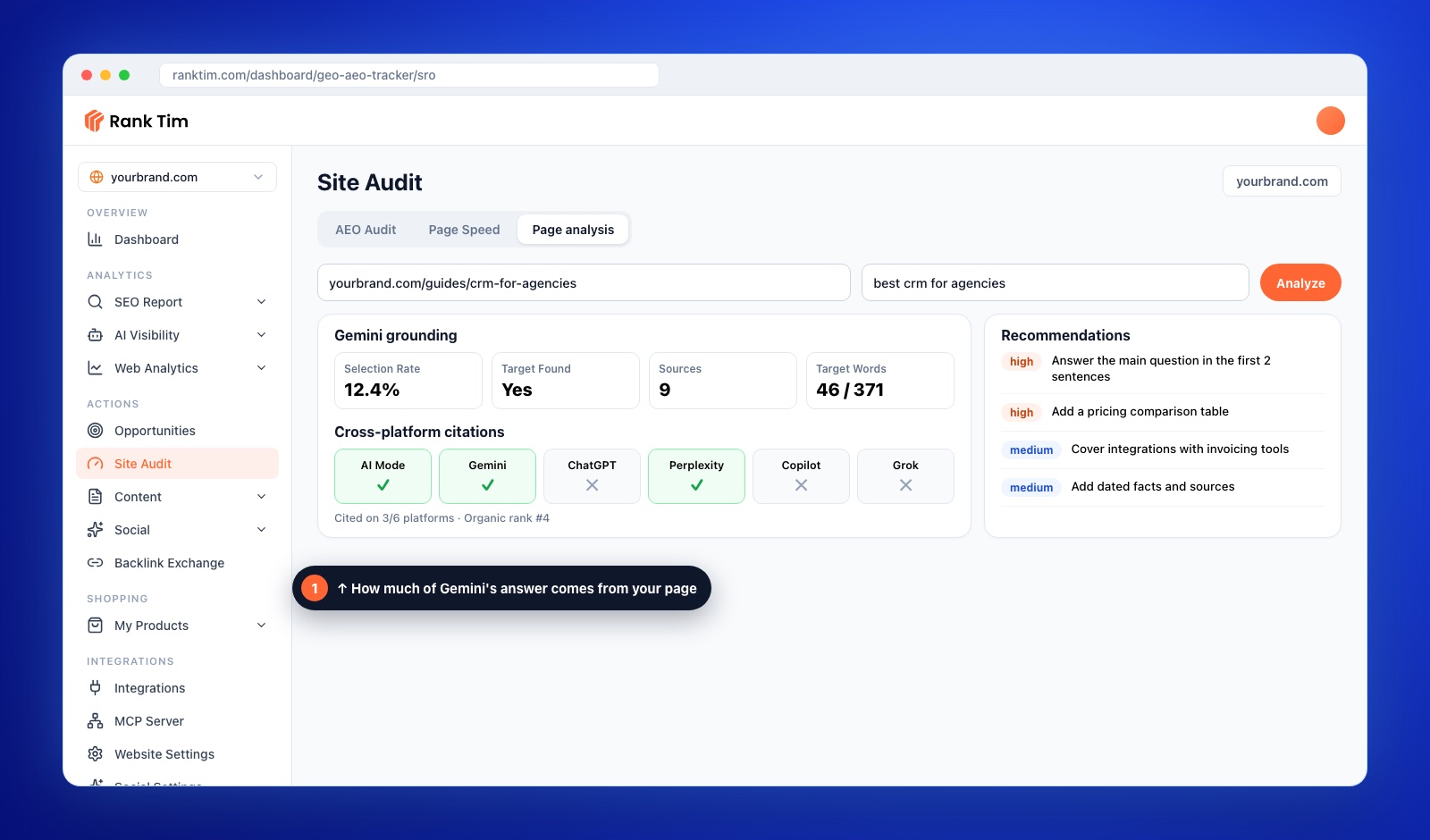
In RankTim, open Site Audit → Page analysis. Enter the page URL and the target keyword, then click Analyze. The analysis runs several checks in sequence:
- Gemini grounding: asks Gemini the question with Google Search grounding and measures which sources support the answer and how much of it comes from your page.
- Cross-platform citations: checks whether Google AI Mode, Gemini, ChatGPT, Perplexity, Copilot and Grok cite your page.
- SERP ranking: looks up where your page ranks in Google for the keyword and who ranks above you.
- Page comparison: reads your page and the competing pages to find gaps.
- Recommendations: an overall score with prioritized fixes grouped into content, structure, technical and strategy.
Step 3: Read the Results and Diagnose the Problem
The combination of results usually points to one main problem:
| What you see | Likely problem | Where to start |
|---|---|---|
| Not ranking and not cited | Discovery | Classic SEO: relevance, internal links, authority |
| Ranking well but not cited | Passage quality | Answer-first sections, clearer facts, better structure |
| Found as a source but low selection rate | Thin coverage of the main answer | Add the facts and sub-topics competitors provide |
| Cited on some platforms but not others | Access or corroboration | Check crawler access, freshness and mentions in other sources |
Step 4: Make the Page Easier to Select
Most improvements fall into a few groups, and they're the same qualities AI systems look for when choosing passages:
- Front-load the answer. Put the direct answer to the target question in the first one or two sentences of the page and of each relevant section.
- Write self-contained sentences. Each key statement should make sense when quoted alone: name the product, the number and the condition.
- Increase factual density. Replace general claims with prices, ranges, dates, steps and named examples.
- Use clear structure. Headings phrased as questions, short paragraphs, lists and comparison tables.
- Fill the content gaps the analysis found, especially sub-topics every competing page covers.
- Add matching structured data where it fits. Our schema markup guide covers the types that help most.
Analyze any page in a few minutes
RankTim's Page analysis checks one URL against one keyword: how much of Gemini's grounded answer comes from your page, which of six AI platforms cite it, where it ranks in Google and what to change first.
Start Your Free TrialStep 5: Learn From the Pages Chosen Instead
The competing pages that AI selects are a free lesson. For each one, note:
- how quickly it answers the question
- what facts, tables or examples it includes that you don't
- whether it's more recent or shows a clearer date
- whether it's a different type of page, for example a comparison instead of a product page
Don't copy them. Use them to understand what the AI considers a complete answer, then make your page more useful than theirs. If the winning pages are comparisons, our guide to comparison and alternatives pages will help.
Step 6: Check Technical Access
If a page is cited by some platforms and ignored by others, rule out technical causes:
- AI crawlers blocked in robots.txt or by a firewall
- important content loaded only with JavaScript
- slow pages or errors when bots request them
- a missing or wrong canonical tag
Our guide to optimizing your website for AI search walks through each check. The AEO Audit and Page Speed tabs, next to Page analysis in RankTim, cover the site-wide side.
Step 7: Re-Run After Changes
Wait until search engines have recrawled the updated page, usually one to three weeks, then run the analysis again with the same keyword. Compare:
- selection rate and the number of words attributed to your page
- the number of platforms citing the page
- organic rank
- which recommendations are still open
Keep a simple log of what you changed and when. Over time, it shows you which kinds of changes move AI citations for your site.
Common Mistakes to Avoid
- Analyzing a page for a keyword it shouldn't win. Match the page to its real search intent.
- Chasing the score instead of the reader. Changes that make the page clearer for people usually help AI selection too.
- Ignoring rankings. If a page isn't found, passage improvements alone won't get it cited.
- Judging on one run. AI answers change; look at trends.
- Rewriting everything at once. Change a few things, re-run and learn what works.
FAQ
What is selection rate?
It's the share of an AI answer that is supported by your page. RankTim measures it with Gemini grounding: the number of words in the grounded answer attributed to your page, divided by all grounded words.
Why does my page rank well in Google but never get cited by AI?
Usually because the page doesn't answer the specific question clearly enough in a short passage, or because other pages provide more concrete facts. Ranking gets you considered; clear, factual passages get you selected.
Which AI platforms does the analysis check?
Google AI Mode, Gemini, ChatGPT, Perplexity, Copilot and Grok, plus Google organic results for the same keyword.
How often should I analyze a page?
After every significant update, and every two to three months for your most important pages. Re-run sooner if rankings or AI citations change suddenly.
Is page analysis the same as tracking prompts?
No. Prompt tracking shows how AI talks about your brand across many questions. Page analysis goes deep on one URL and one keyword to explain why that page is or isn't used.
When AI skips your best page, the reason is usually specific and fixable: it isn't found, it isn't the clearest passage or it's missing what competitors provide. Analyze the page, fix the biggest gap first and measure again. That's how good pages become cited pages.
Find Out Why AI Skips Your Best Pages
Check grounding, AI citations and rankings for any page, get prioritized recommendations and track the results across ChatGPT, Gemini, Perplexity, Google AI and more.
Start for Free
Catalin Dinca
Written by Catalin Dinca