

How to Build Comparison and Alternatives Pages That Rank and Get Cited by AI
 Catalin Dinca
Someone searching "HubSpot vs Pipedrive" or asking ChatGPT "what are the best alternatives to HubSpot for a small agency?" has already done their research. They know the category, they have a shortlist and they're close to a decision. Few queries carry more buying intent.
Yet many brands avoid these pages, or publish thin ones that list their own strengths and ignore everything else. Readers notice, and so do AI assistants, which prefer sources that compare fairly and back their claims.
This guide shows how to build comparison and alternatives pages that rank in Google and get cited by AI: which comparisons to build first, how to structure a page that earns trust, what proof to include and how to measure whether it works.
Time needed: about four to six hours for the first page, including research; less for each one after, once you have a template.
The Three Comparison Page Types
| Page type | Example query | What the reader wants |
|---|---|---|
| You vs a competitor | "YourBrand vs HubSpot" | A fair head-to-head and a clear "choose X if…" verdict |
| Alternatives to a competitor | "HubSpot alternatives for small teams" | A shortlist of options, each with who it suits best |
| Competitor vs competitor | "HubSpot vs Pipedrive" | An expert view on two tools, sometimes with a third option |
Start with the first two. They are the most directly connected to what you sell, and they're where buyers who already know your competitors can discover you.
Step 1: Choose Which Comparisons to Build
Prioritize the competitors buyers actually compare you with, not the biggest names in the industry. Good signals:
- Sales conversations: which tools prospects mention when they evaluate you.
- Search Console: queries that already contain a competitor name and bring you impressions.
- AI answers: run prompts like "[competitor] alternatives" and "[you] vs [competitor]" and see who gets named. Our prompt research tutorial shows how to build the list.
- Win/loss reasons: where you consistently win or lose deals against a specific rival.
Step 2: Learn How AI Already Describes Each Competitor
Before writing, find out what AI assistants say about the competitor and about you. Their answers summarise the positioning the web has settled on, including the strengths and weaknesses buyers will hear.
In RankTim, add your competitors in AI Visibility → Competitors and click Build Battlecards. Each battlecard summarises how AI models describe that competitor, with its strengths, weaknesses and the overall sentiment.
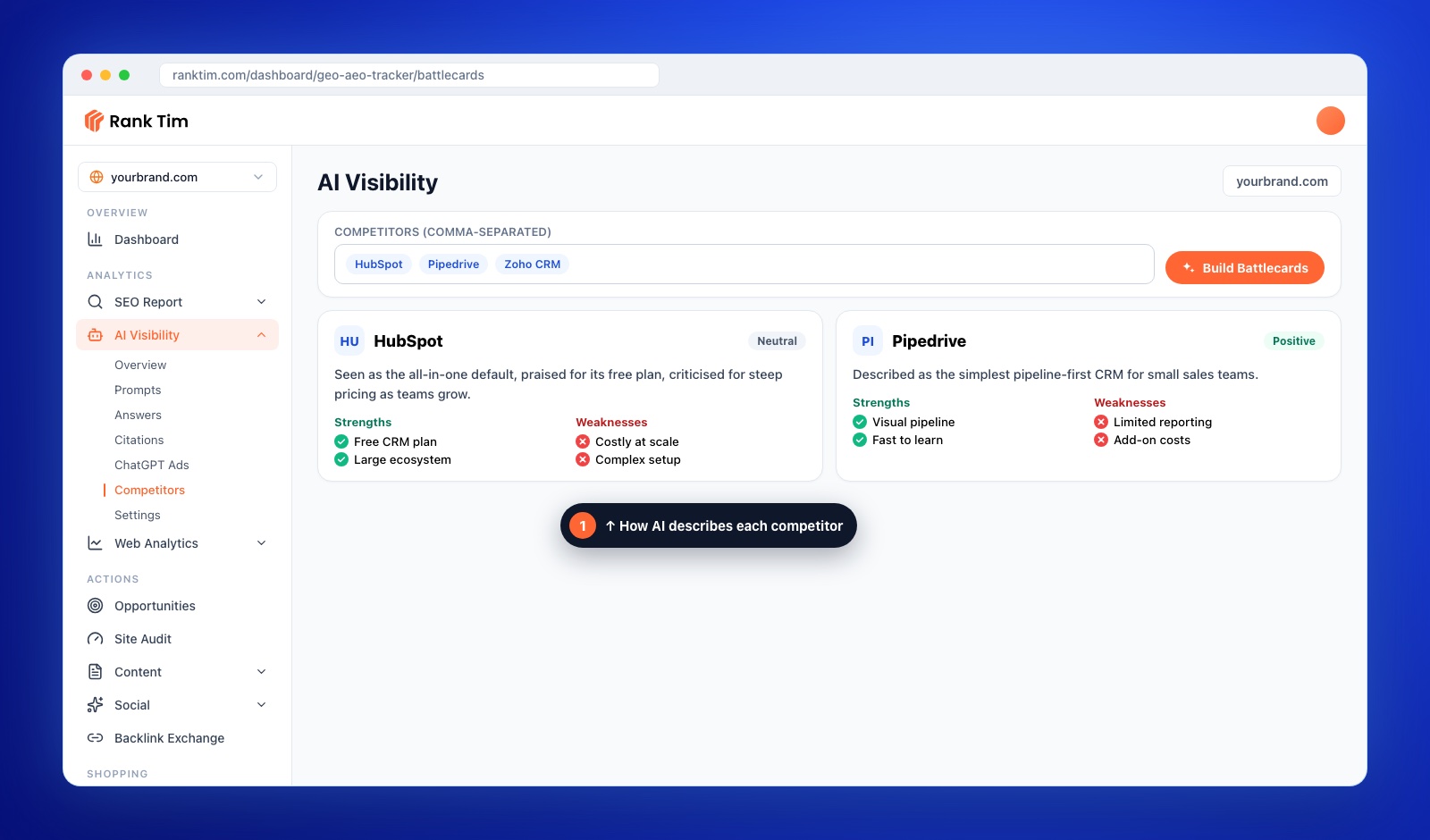
Use this to find your angle: the gap between what the competitor is known for and what a specific type of buyer needs. "Great all-in-one platform, but costly as teams grow" points straight at a page for small teams on a budget.
Step 3: Open with a Fair Verdict
Put the answer first, in two or three sentences, before any table:
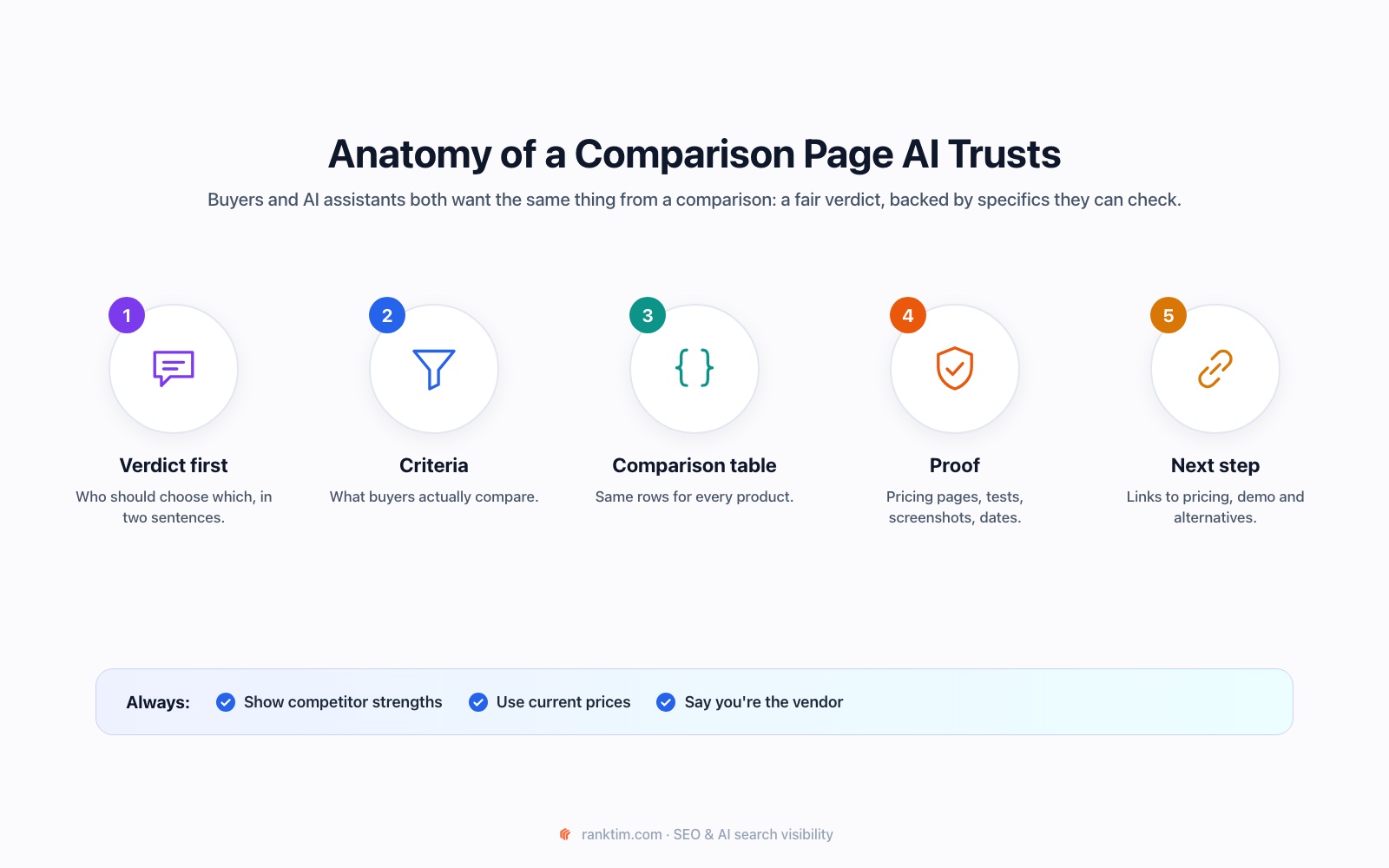
Choose HubSpot if you want a free plan and a large marketplace of integrations. Choose YourBrand if you're an agency managing many client accounts and want separate client workspaces at a lower price.
This is the passage most likely to be quoted by AI assistants and shown in search snippets. It also tells the reader you're going to be honest, which keeps them reading.
Step 4: Build a Like-for-Like Comparison Table
The table is the heart of the page. Rules that make it trustworthy:
- Same criteria for every product, chosen by what buyers actually compare: price, key features, limits, integrations, support, best fit.
- Specific values, not "yes/no" alone: "From 29 EUR per user / month", "Up to 10,000 contacts".
- A "last checked" date for prices and plans.
- Include the competitor's real advantages, not only yours.
Use a real HTML table, not an image, so search engines and AI systems can read it.
Step 5: Back Every Claim with Proof
Comparison pages are only as credible as their evidence:
- Link to official pricing and documentation pages for every competitor fact.
- Use your own testing: screenshots, setup time, how a workflow looks in each tool.
- Quote real customer reasons for switching, with permission.
- Disclose that you're the vendor, clearly, near the top.
Comparative advertising is regulated in many markets. In the EU, Directive 2006/114/EC allows comparisons that are not misleading and that objectively compare relevant, verifiable features of comparable products. Check the rules in each country you target.
See how AI describes you and your competitors
RankTim's Competitors view builds a battlecard for each rival from AI answers: how it's positioned, its strengths, its weaknesses and the sentiment around it. It's the fastest way to find the angle for a comparison page.
Start Your Free TrialStep 6: Structure the Rest of the Page
A proven outline for a "you vs competitor" page:
- Verdict (Step 3)
- Comparison table (Step 4)
- Key differences explained, one H2 per decision factor: pricing, ease of use, specific features, integrations, support
- Who should choose the competitor
- Who should choose you
- How to switch, if relevant: migration steps, time needed, what transfers
- FAQ with the follow-up questions buyers ask
For an "alternatives" page, replace the head-to-head with one section per alternative: what it is, who it's best for, pricing, main strength, main limitation. Put yourself in the list where you genuinely fit, not automatically at number one.
Step 7: Add Schema, Links and a Clear Next Step
- Schema: Article or BlogPosting with a named author, and FAQPage if the FAQ is visible on the page. Our schema markup guide for AI search has examples.
- Internal links: from your pricing, features and relevant blog posts to the comparison, and from the comparison to your pricing and demo pages.
- Cluster the comparisons: link "vs" pages and "alternatives" pages to each other and to a category page. Our topic clusters tutorial explains the structure.
- One call to action: start a trial, book a demo or see pricing.
Step 8: Keep Every Comparison Current
Competitors change pricing and features often. An outdated comparison loses trust quickly and can mislead buyers.
- Review each comparison page at least quarterly, and immediately after a competitor's pricing change or major launch.
- Update the "last checked" date only when you've actually re-checked.
- Our content refresh guide covers how to plan these updates.
Step 9: Measure Rankings and AI Citations
Track three things for each comparison page:
- Rankings for "[you] vs [competitor]", "[competitor] alternatives" and related queries in the Rank Tracker.
- AI citations and mentions for the same comparison prompts: is your page cited, and are you named in the answer?
- Conversions from the page: trials, demos or sales, because these pages exist to support decisions.
Comparison Page Checklist
- Competitor chosen from sales, Search Console and AI answer data
- AI's current description of the competitor and of you reviewed
- Fair verdict in the first paragraph, with "choose X if…" guidance
- Like-for-like HTML table with specific values and a "last checked" date
- Every competitor fact linked to an official source
- Vendor disclosure near the top
- Sections for who should choose each option
- Schema, internal links and one clear call to action
- Quarterly review scheduled
Frequently Asked Questions
Is it legal to name competitors on my website?
In most markets, yes, as long as the comparison is truthful, not misleading and based on verifiable facts. Rules differ by country, so check the regulations where you sell and avoid using competitors' logos or trademarks in ways that suggest endorsement.
Should my product always come out on top?
No. Readers and AI assistants trust pages that acknowledge where a competitor is stronger. A credible "choose them if…" section often converts better than a one-sided page.
How many comparison pages should I create?
Start with your three to five most common competitors, plus one alternatives page for the market leader. Add more only when sales or search data shows real demand.
Do comparison pages help with AI search?
Yes. "X vs Y" and "best alternatives to X" are common prompts in AI assistants, and pages with a clear verdict, a structured table and sourced facts are easy for them to quote and cite.
Comparison pages meet buyers at the moment they're choosing. Build them honestly, keep them current and back every claim, and they become some of the most valuable pages on your site, in search and in AI answers.
Win the "X vs Y" Questions in Google and AI
Track comparison prompts across AI assistants, see which pages they cite and how they describe each competitor, then build the pages that close the gap.
Start for Free
Catalin Dinca
Written by Catalin Dinca