

How to Plan a Month of Social Media Posts in 30 Minutes
 Catalin Dinca
Posting on social media every day isn't hard because of the posting. It's hard because of the deciding. What do we post today? Do we have a photo? Is this on-brand? Multiply that by 30 days and most small teams quietly give up by the second week.
The fix is to stop planning one post at a time. Make the big decisions once a month, let the calendar and the first drafts flow from them, and spend your daily energy only on adding what makes posts real: photos, offers and replies.
Here's how to do it in about 30 minutes.

Why Consistency Matters for More Than Social
A steady presence on social platforms does more than reach followers:
- It keeps your brand in front of buyers between the moments they search for you.
- It sends people to your best content, from product pages to your latest guides.
- It strengthens your brand as an entity. Your social profiles are among the places search engines and AI assistants look to confirm who you are. An active, consistent profile linked from your website (and listed in your schema's sameAs) reinforces that picture.
None of that works if the account goes quiet for three weeks every time things get busy.
Step 1: Choose 3 to 5 Content Pillars (5 minutes)
Pillars are the recurring themes you want to be known for. They stop you from starting every week from a blank page.
A simple formula: one pillar that teaches, one that shows your work, one that proves results, one that sells and, optionally, one that's personal.
| Pillar | Example for a dental clinic | Example for a B2B SaaS |
|---|---|---|
| Teach | Quick oral-care tips, myths vs facts | How-to tips, short frameworks, common mistakes |
| Show the work | Behind the scenes, new equipment, the team | Product updates, how a feature was built |
| Social proof | Patient reviews (with consent), before and after | Customer results, quotes, case study highlights |
| Offer | Seasonal check-up campaign, booking reminder | Free trial, webinar, new plan |
| Personal | Why the founder started the clinic | Lessons from the founder, team milestones |
In RankTim, put these in Social Settings → Brand & content → Content themes, together with the Post language and your Default channels. Every generated post will draw on them.
Step 2: Pick Channels and a Weekly Rhythm (5 minutes)
Be where your customers actually are, not everywhere:
- Instagram and Facebook for local businesses, retail, hospitality, health and anything visual.
- LinkedIn for B2B, professional services and recruiting.
- TikTok and X only if you can sustain the format and your audience is there.
Then set a realistic rhythm. Three to five posts a week that you sustain beat daily posting that stops after ten days. A simple weekly pattern might be: Monday teach, Wednesday show the work, Friday social proof, plus one offer every other week.
Step 3: Generate the 30-Day Calendar (5 minutes)
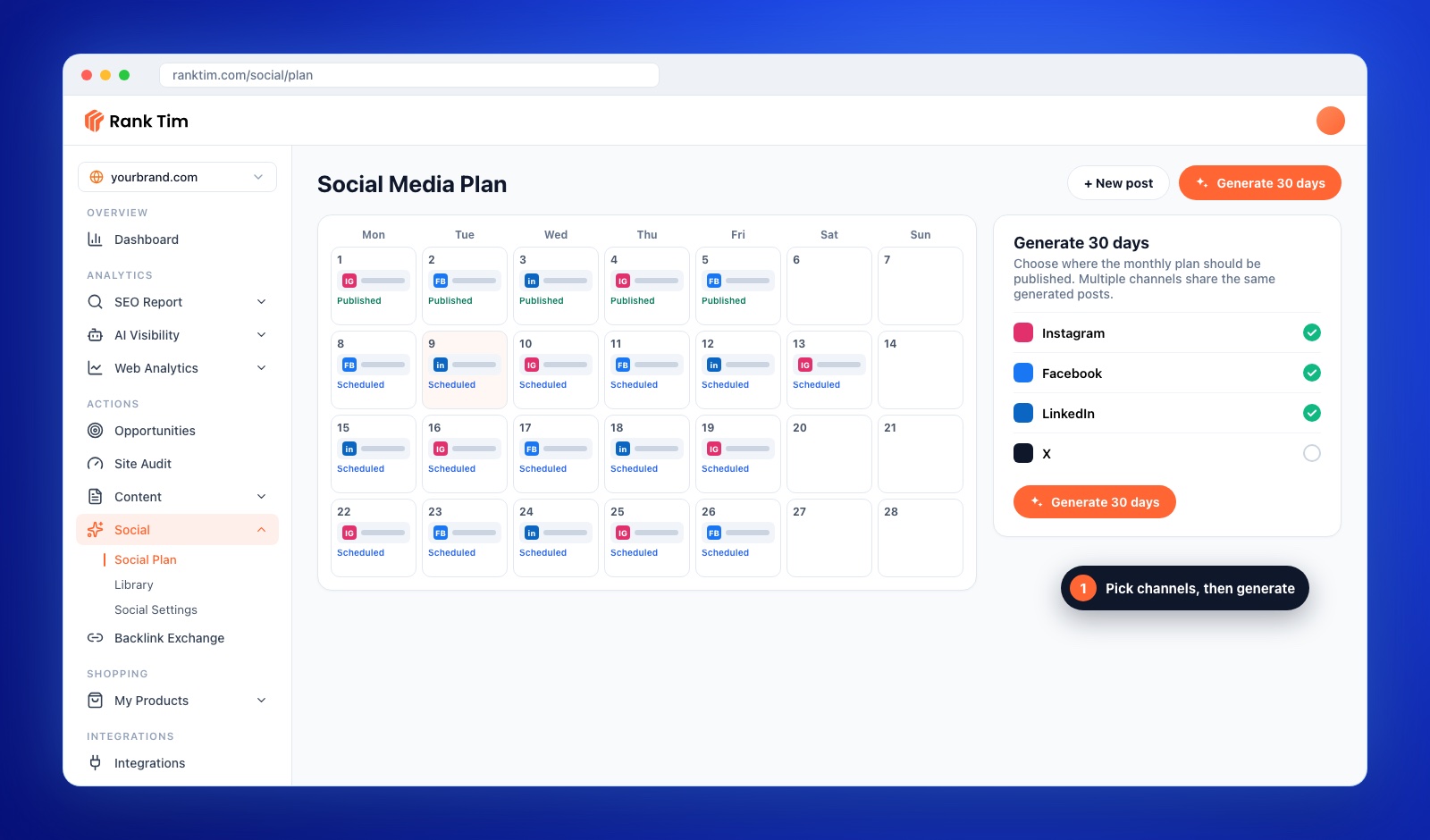
In RankTim, open Social Plan and click Generate 30 days. Choose the channels the monthly plan should be published to; multiple channels share the same generated posts. RankTim fills the calendar with a post for each scheduled day, written in your brand voice and drawing on your content themes, with an image for each.
Prefer to work manually? Use a spreadsheet with columns for date, channel, pillar, hook, caption, visual and status, and fill one row per post using your weekly pattern.
Generate your month while you read
RankTim's Social Plan drafts a month of posts in your brand voice, lets you add your own photos and publishes to Facebook and Instagram on schedule.
See the Social Media ManagerStep 4: Review in One Pass (10 minutes)
AI gives you a strong first draft. The review is where you make it yours. Skim the month and, for each post, check:
- Is it true and specific? Replace generic claims with a real number, name or example.
- Does it sound like you? Cut phrases you'd never say.
- Is there a real image? Original photos of your team, place and work outperform stock and AI visuals for trust. In RankTim you can upload your own photo for a day and use Write a post for my photo to get a caption written from it.
- Is the call to action clear? One action per post: book, read, reply, try.
Use Regenerate for any post that misses, and move posts around the calendar if timing matters (a launch date, a holiday, an event).
Step 5: Schedule and Auto-Publish (5 minutes)
Connect your accounts once in Social Settings → Integrations. With a Facebook Page or an Instagram business account connected, RankTim publishes your plan on schedule. LinkedIn auto-posting is coming soon; until then, you can copy LinkedIn posts from the calendar when they're due.
After that, your daily work shrinks to two things: replying to comments and messages, and adding a timely post when something worth sharing happens.
Measure What Matters
Once a month, before planning the next one, look at:
- Engagement by pillar: which themes get saves, shares and comments? Do more of those.
- Clicks to your site: which posts drive visits to product pages or guides? Track them in GA4 with UTM-tagged links.
- Leads and bookings attributed to social, so the effort is judged on results, not likes.
Then adjust your pillars and rhythm and generate the next month.
Monthly Social Planning Checklist
- 3 to 5 content pillars written down
- Channels chosen based on where customers are
- A weekly rhythm you can actually sustain
- 30-day calendar generated
- Every post reviewed for accuracy, voice, image and call to action
- Real photos added where they matter
- Facebook and Instagram connected for auto-publishing
- Last month's results reviewed before planning the next
Frequently Asked Questions
How often should a small business post on social media?
Three to five times a week on your main channel is a sustainable starting point for most small businesses. Consistency over months matters more than daily volume for a few weeks.
Is it okay to use AI to write social posts?
Yes, as a first draft. Review every post for accuracy and voice, add real photos and specifics, and never publish claims you can't back up.
Which channels can RankTim publish to automatically?
Facebook Pages and Instagram business accounts today, with LinkedIn coming soon. Posts for other channels can be planned in the same calendar.
Which plans include the Social Media Manager?
The social toolkit is included in the Social Plus plan, with 30 AI-generated posts per month, as well as in Growth and Enterprise.
The secret to consistent social media isn't more motivation. It's fewer decisions. Make them once a month, and let the calendar carry the rest.
A Whole Month of Posts, Ready in Minutes
Plan, generate and schedule your social posts from one calendar. AI writes the first draft in your voice, you approve it, RankTim publishes it.
Try Social Plus for 3 Days
Catalin Dinca
Written by Catalin Dinca